Working with Images


Working with Images

Images can improve the design and the appearance of a web page.

ਤਸਵੀਰਾਂ ਇਕ ਵਧੀਆ ਵੈੱਬ ਸਾਈਟ ਦਾ ਅਹਿਮ ਹਿੱਸਾ ਹੁੰਦੀਆਂ ਹਨ।  ਤਸਵੀਰਾਂ ਵੈੱਬ ਪੇਜਾਂ ਨੂੰ ਆਕਰਸ਼ਕ ਬਣਾਉਦੀਆਂ ਹਨ। ਤਸਵੀਰਾਂ ਨੂੰ ਵੈੱਬ ਪੇਜਾਂ ਉੱਪਰ ਬਟਨਾਂ ਦੀ ਤਰ੍ਹਾਂ ਵੀ ਵਰਤਿਆ ਜਾ ਸਕਦਾ ਹੈ।  HTML Documents ਵਿਚ ਤਸਵੀਰਾਂ ਦੀ ਵਰਤੋਂ ਕਰਨ ਲਈ ਸਾਨੂੰ ਉਹਨਾਂ ਸਬੰਧੀ ਕੁੱਝ ਮੁੱਖ ਗੱਲਾਂ ਸਬੰਧੀ ਜਾਣਕਾਰੀ ਪਤਾ ਹੋਣੀ ਚਾਹੀਦੀ ਹੈ। 


ਵੈੱਬ ਪੇਜ਼ ਵਿੱਚ ਤਸਵੀਰ ਦਾਖਲ ਕਰਨ ਲਈ ਅਸੀਂ HTML Document ਵਿਚ <img> tag ਦੀ ਵਰਤੋਂ ਕਰਦੇ ਹਾਂ। <img> tag ਇਕ ਅਨਪੇਅਰ/ਐਂਪਟੀ  tag ਹੈ, ਜਿਸ ਦਾ ਅਰਥ ਹੈ ਕਿ ਇਸਦਾ ਕੋਈ closing tag ਨਹੀਂ ਹੁੰਦਾ। ਵੈੱਬ ਪੇਜ਼ ਵਿੱਚ ਤਸਵੀਰ ਦਾਖਲ ਕਰਨ ਲਈ ਹੇਠ ਲਿਖੇ ਬੁਨਿਆਦੀ Syntax ਦੀ ਵਰਤੋਂ ਕੀਤੀ ਜਾ ਸਕਦੀ ਹੈ। 

<img src="image_url">

ਇਸ Syntax ਵਿੱਚ src attribute <img> ਟੈਗ ਦਾ ਇੱਕ ਜਰੂਰੀ attribute ਹੁੰਦਾ ਹੈ ਜਿਸ ਦਾ ਪੂਰਾ ਨਾਂ ਸੋਰਸ (Source) ਹੈ।  ਹਰੇਕ Image ਟੈਗ ਵਿਚ ਇਕ src attribute ਹੁੰਦਾ ਹੈ ਜੋ ਵੈੱਬ ਬ੍ਰਾਊਜ਼ਰ ਨੂੰ ਇਹ ਦੱਸਦਾ ਹੈ ਕਿ ਉਹ ਤਸਵੀਰ ਜੋ ਅਸੀਂ ਵੈੱਬ ਪੇਜ਼ ਵਿੱਚ ਪ੍ਰਦਰਸ਼ਿਤ ਕਰਨਾ ਚਾਹੁੰਦੇ ਹਾਂ, ਕਿਥੋਂ ਲੱਭਣਾ ਹੈ। "Image_Url" ਉਸ location ਨੂੰ ਦਰਸਾਉਂਦਾ ਹੈ ਜਿੱਥੇ ਤਸਵੀਰ ਨੂੰ ਸਟੋਰ ਕੀਤਾ ਗਿਆ ਹੈ। 


HTML Images Syntax

The HTML <img> tag is used to embed an image in a web page.

Images are not technically inserted into a web page; images are linked to web pages. The <img> tag creates a holding space for the referenced image.

The <img> tag is empty, it contains attributes only, and does not have a closing tag.

The <img> tag has two required attributes:

  • src - Specifies the path to the image
  • alt - Specifies an alternate text for the image

Syntax

<img src="image_url" alt="alternatetext">


The src Attribute

The required src attribute specifies the path (URL) to the image.

Note: When a web page loads, it is the browser, at that moment, that gets the image from a web server and inserts it into the page. Therefore, make sure that the image actually stays in the same spot in relation to the web page, otherwise your visitors will get a broken link icon. The broken link icon and the alt text are shown if the browser cannot find the image.

Example

<img src="cat.jpg" alt="cat">


The alt Attribute

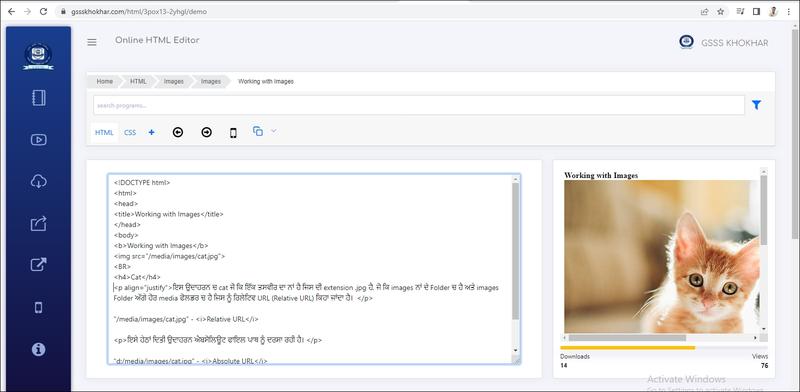
The required alt attribute provides an alternate text for an image, if the user for some reason cannot view it (because of slow connection, an error in the src attribute, or if the user uses a screen reader).

The value of the alt attribute should describe the image:

Example

<img src="cat.jpg" alt="cat">


If a browser cannot find an image, it will display the value of the alt attribute:


Output


Live Demo & Try it yourself!

Common Image Formats

Here are the most common image file types, which are supported in all browsers (Chrome, Edge, Firefox, Safari, Opera):

Abbreviation File Format File Extension
APNG Animated Portable Network Graphics .apng
GIF Graphics Interchange Format .gif
ICO Microsoft Icon .ico, .cur
JPEG Joint Photographic Expert Group image .jpg, .jpeg, .jfif, .pjpeg, .pjp
PNG Portable Network Graphics .png
SVG Scalable Vector Graphics .svg


Note: Loading large images takes time, and can slow down your web page. Use images carefully.
Setting Alternate Text for Image


Setting Alternate Text for Image

The alt Attribute

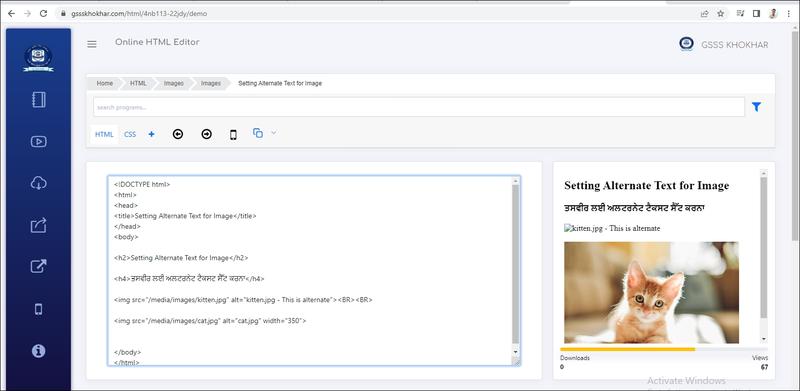
The required alt attribute provides an alternate text for an image, if the user for some reason cannot view it (because of slow connection, an error in the src attribute, or if the user uses a screen reader).

The value of the alt attribute should describe the image:

Example

<img src="cat.jpg" alt="cat">


Output


Live Demo & Try it yourself!

Setting Width and Height of the Image


Setting Width and Height of the Image

Image Size - Width and Height

You can use the style attribute to specify the width and height of an image.

Width ਅਤੇ Height ਦੀ ਵਰਤੋਂ ਇੱਕ ਤਸਵੀਰ ਦੀ ਚੋੜਾਈ ਅਤੇ ਉਚਾਈ ਸੈੱਟ ਕਰਨ ਲਈ ਕੀਤੀ ਜਾਂਦੀ ਹੈ। ਇਹਨਾਂ attribute ਦੇ ਮੁੱਲ ਮੂਲ ਰੂਪ ਵਿੱਚ (by default) ਪਿਕਸਲਾਂ (pixels) ਵਿੱਚ ਸੈੱਟ ਹੁੰਦੇ ਹਨ। 


Live Demo & Try it yourself!

Setting Image Border


Setting Image Border


Live Demo & Try it yourself!

Setting Image Alignment


Setting Image Alignment

HTML document ਵਿਚ <img> ਟੈਗ ਦੇ align attribute ਦੀ ਮਦਦ ਨਾਲ ਤਸਵੀਰ ਦੀ alignment ਸੈੱਟ ਕੀਤੀ ਜਾ ਸਕਦੀ ਹੈ।  ਇਹ attribute ਆਲੇ-ਦੁਆਲੇ ਦੇ ਤੱਤਾਂ ਦੇ ਅਨੁਸਾਰ ਤਸਵੀਰ ਦੀ alignement ਸੈੱਟ ਕਰਦਾ ਹੈ।  ਮੂਲ ਰੂਪ ਵਿੱਚ ਤਸਵੀਰ ਹੇਠਲੇ ਪਾਸੇ ਤੋਂ bottom align ਹੋਵੇਗੀ। <img> ਟੈਗ ਲਈ align attribute ਦੇ ਸੰਭਾਵਤ ਮੁੱਲ ਇਸ ਪ੍ਰਕਾਰ ਹਨ।     

  • left  : ਇਹ ਤਸਵੀਰ ਦੀ alignment ਖੱਬੇ ਪਾਸੇ ਸੈੱਟ ਕਰਦਾ ਹੈ। 
  • right : ਇਹ ਤਸਵੀਰ ਦੀ alignment ਸੱਜੇ ਪਾਸੇ ਸੈੱਟ ਕਰਦਾ ਹੈ। 
  • middle : ਇਹ ਤਸਵੀਰ ਦੀ alignment ਮਿਡਲ ਪਾਸੇ ਸੈੱਟ ਕਰਦਾ ਹੈ। 
  • top : ਇਹ ਤਸਵੀਰ ਦੀ alignment ਉੱਪਰਲੇ ਪਾਸੇ ਸੈੱਟ ਕਰਦਾ ਹੈ। 
  • bottom : ਇਹ ਤਸਵੀਰ ਦੀ alignment ਹੇਠਲੇ ਪਾਸੇ ਸੈੱਟ ਕਰਦਾ ਹੈ। 


Live Demo & Try it yourself!

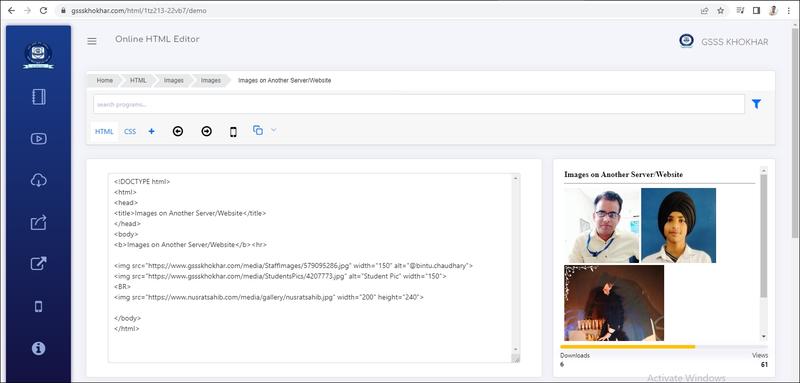
Images on Another Server/Website


Images on Another Server/Website

Some web sites point to an image on another server.

To point to an image on another server, you must specify an absolute (full) URL in the src attribute:


Output


Live Demo & Try it yourself!

Notes on external images: External images might be under copyright. If you do not get permission to use it, you may be in violation of copyright laws. In addition, you cannot control external images; they can suddenly be removed or changed.

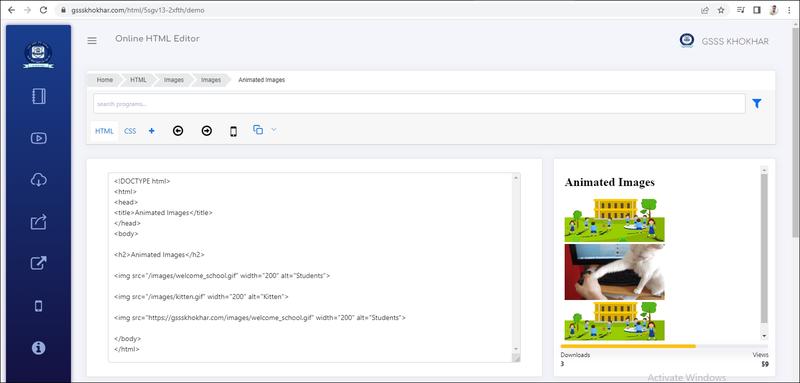
Animated Images


Animated Images

Animated images is for any media containing a rapid display of a sequence of images of 2-D or 3-D artwork or model positions in order to create an illusion of movement. The most common method of presenting animation is as a motion picture or video program.


HTML allows moving images:


Output


Live Demo & Try it yourself!

Image Floating


Image Floating

Use the CSS float property to let the image float to the right or to the left of a text:


Live Demo & Try it yourself!

Create Map on Image


Create Map on Image

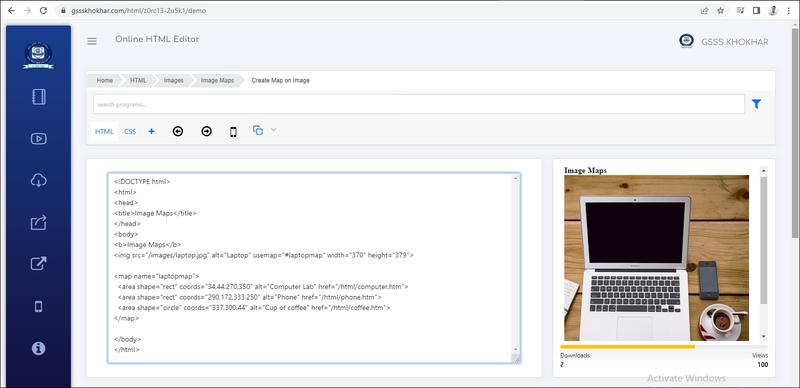
The HTML <map> tag defines an image map. An image map is an image with clickable areas. The areas are defined with one or more <area> tags.

Try to click on the computer, phone, or the cup of coffee in the image below:


Output


Live Demo & Try it yourself!

How Does it Work?

The idea behind an image map is that you should be able to perform different actions depending on where in the image you click.

To create an image map you need an image, and some HTML code that describes the clickable areas.


The Image

The image is inserted using the <img> tag. The only difference from other images is that you must add a usemap attribute:

<img src="laptop.jpg" usemap="#laptopmap">

The usemap value starts with a hash tag # followed by the name of the image map, and is used to create a relationship between the image and the image map.

Tip: You can use any image as an image map!


Create Image Map

Then, add a <map> element.

The <map> element is used to create an image map, and is linked to the image by using the required name attribute:

<map name="laptopmap">

The name attribute must have the same value as the <img>'s usemap attribute .


The Areas

Then, add the clickable areas.

A clickable area is defined using an <area> element.

Shape

You must define the shape of the clickable area, and you can choose one of these values:

  • rect - defines a rectangular region
  • circle - defines a circular region
  • poly - defines a polygonal region
  • default - defines the entire region

You must also define some coordinates to be able to place the clickable area onto the image. 


Shape="rect"

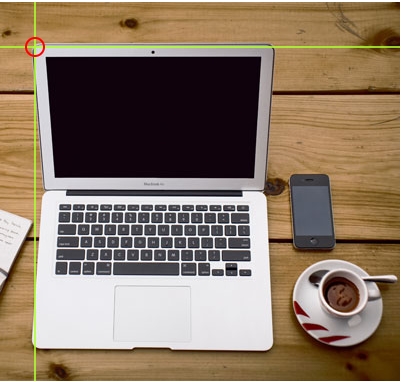
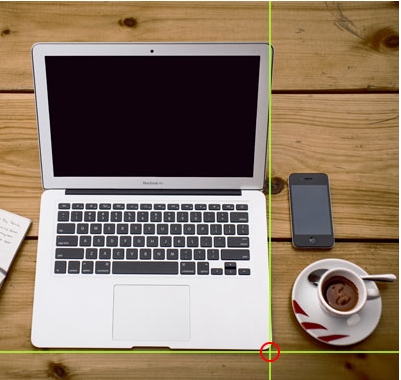
The coordinates for shape="rect" come in pairs, one for the x-axis and one for the y-axis.

So, the coordinates 34,44 is located 34 pixels from the left margin and 44 pixels from the top:

The coordinates 270,350 is located 270 pixels from the left margin and 350 pixels from the top:

Now we have enough data to create a clickable rectangular area:


Example

<area shape="rect" coords="34, 44, 270, 350" href="computer_lab.htm">

This is the area that becomes clickable and will send the user to the page "computer.htm":

Shape="circle"

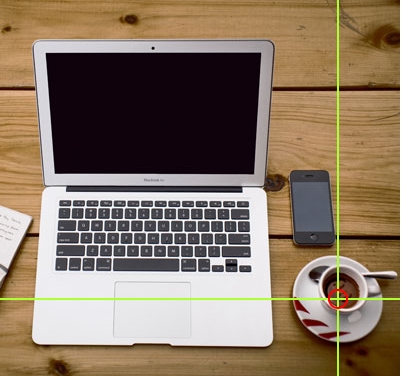
To add a circle area, first locate the coordinates of the center of the circle:

337,300

Then specify the radius of the circle:

44 pixels


Now you have enough data to create a clickable circular area:

Example

<area shape="circle" coords="337, 300, 44" href="coffee.htm">

This is the area that becomes clickable and will send the user to the page "coffee.htm":


Background Image on a HTML element


Background Image on a HTML element

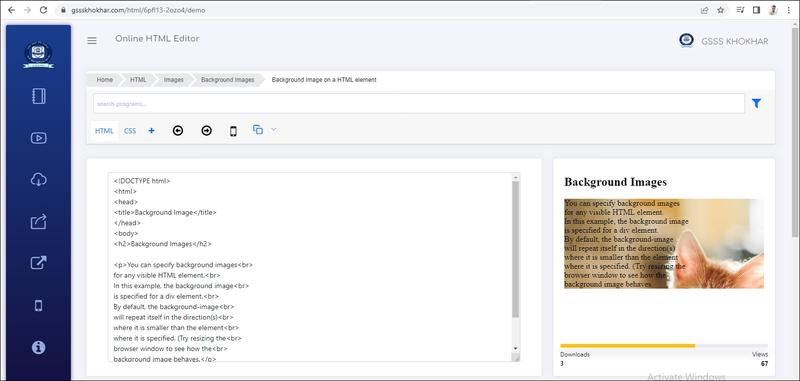
To add a background image on an HTML element, use the HTML style attribute and the CSS background-image property:

Example

Add a background image on a HTML element:

<p style="background-image: url('cat.jpg');">

You can also specify the background image in the <style> element, in the <head> section:


Output


Live Demo & Try it yourself!

Background Image on a Page


Background Image on a Page

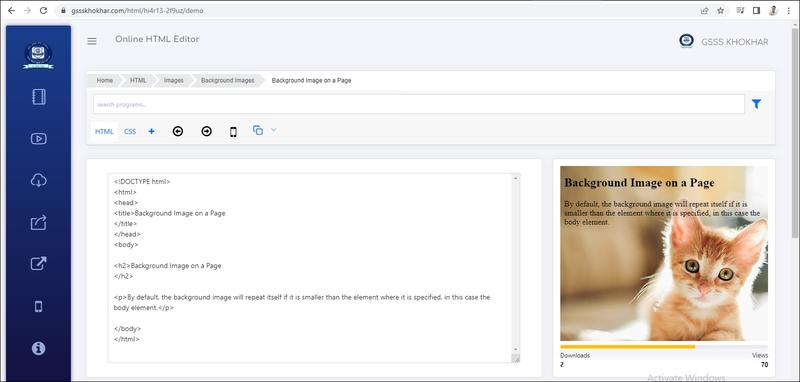
If you want the entire page to have a background image, you must specify the background image on the <body> element:

Example

Add a background image for the entire page:

<style>
body {
  background-image: url('img_girl.jpg');
}
</style>


Output


Live Demo & Try it yourself!

Background Repeat


Background Repeat

If the background image is smaller than the element, the image will repeat itself, horizontally and vertically, until it reaches the end of the element:


Live Demo & Try it yourself!

Background No Repeat


Background No Repeat

To avoid the background image from repeating itself, set the background-repeat property to no-repeat.

<style>
body {
  background-image: url('cat.jpg');
  background-repeat: no-repeat;
}
</style>


Live Demo & Try it yourself!

Background Cover


Background Cover

If you want the background image to cover the entire element, you can set the background-size property to cover.

Also, to make sure the entire element is always covered, set the background-attachment property to fixed:

This way, the background image will cover the entire element, with no stretching (the image will keep its original proportions):

<style>
body {
  background-image: url('cat.jpg');
  background-repeat: no-repeat;
  background-attachment: fixed;
  background-size: cover;
}
</style>


Live Demo & Try it yourself!

Background Stretch


Background Stretch

If you want the background image to stretch to fit the entire element, you can set the background-size property to 100% 100%:

Try resizing the browser window, and you will see that the image will stretch, but always cover the entire element.

<style>
body {
  background-image: url('cat.jpg');
  background-repeat: no-repeat;
  background-attachment: fixed;
  background-size: 100% 100%;
}
</style>


Live Demo & Try it yourself!

The picture Element


The picture Element

The HTML <picture> element gives web developers more flexibility in specifying image resources.

The <picture> element contains one or more <source> elements, each referring to different images through the srcset attribute. This way the browser can choose the image that best fits the current view and/or device.

Each <source> element has a media attribute that defines when the image is the most suitable.

Example

Show different images for different screen sizes:

<picture>
  <source media="(min-width: 650px)" srcset="/images/cat.jpg">
  <source media="(min-width: 465px)" srcset="/images/computer_lab.jpg">
  <img src="/images/computer_lab.jpg" style="width:auto;">
</picture>


Live Demo & Try it yourself!

Note: Always specify an <img> element as the last child element of the <picture> element. The <img> element is used by browsers that do not support the <picture> element, or if none of the <source> tags match.


When to use the Picture Element

There are two main purposes for the <picture> element:

1. Bandwidth

If you have a small screen or device, it is not necessary to load a large image file. The browser will use the first <source> element with matching attribute values, and ignore any of the following elements.

2. Format Support

Some browsers or devices may not support all image formats. By using the <picture> element, you can add images of all formats, and the browser will use the first format it recognizes, and ignore any of the following elements.

Example

The browser will use the first image format it recognizes:

<picture>
  <source srcset="/images/cat.png">
  <source srcset="/images/computer_lab.jpg">
  <img src="img_beatles.gif" alt="Beatles" style="width:auto;">
</picture>

Create Rounded/Circle Image


Create Rounded/Circle Image

Step 1) Add HTML:

Example

<img src="/images/cat.jpg">


Step 2) Add CSS:

Use the border-radius property to add rounded corners to an image. 50% will make the image circular:

Example

img {
  border-radius: 50%;
}


<img src="/images/cat.jpg" alt="cat" style="border-radius:50%;width:200px;">


Output


Live Demo & Try it yourself!