

Layout Elements and Techniques


Layout Elements and Techniques


Live Demo & Try it yourself!

Layout Elements

HTML has several semantic elements that define the different parts of a web page:
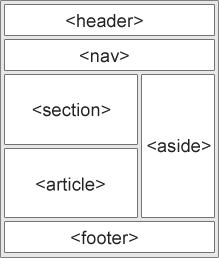
  • <header> - Defines a header for a document or a section
  • <nav> - Defines a set of navigation links
  • <section> - Defines a section in a document
  • <article> - Defines an independent, self-contained content
  • <aside> - Defines content aside from the content (like a sidebar)
  • <footer> - Defines a footer for a document or a section
  • <details> - Defines additional details that the user can open and close on demand
  • <summary> - Defines a heading for the <details> element

CSS Float Layout


CSS Float Layout

It is common to do entire web layouts using the CSS float property. Float is easy to learn - you just need to remember how the float and clear properties work. Disadvantages: Floating elements are tied to the document flow, which may harm the flexibility. 


Live Demo & Try it yourself!

Flexbox Layout


Flexbox Layout

Use of flexbox ensures that elements behave predictably when the page layout must accommodate different screen sizes and different display devices.


Live Demo & Try it yourself!
