Unordered HTML List


Unordered HTML List

Unordered HTML List

An unordered list starts with the <ul> tag. Each list item starts with the <li> tag.

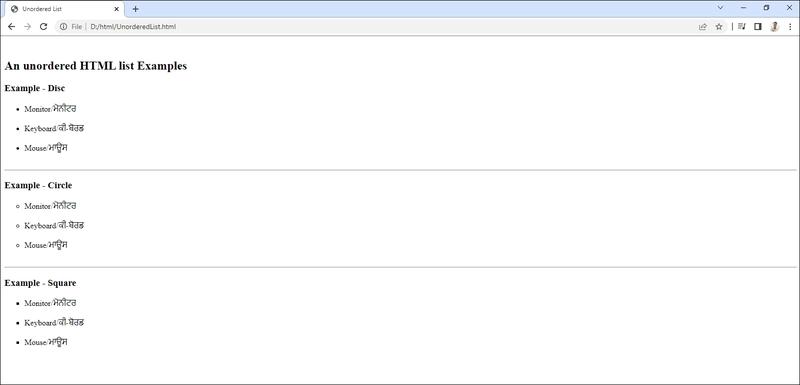
The list items will be marked with bullets (small black circles) by default:


HTML ਲਿਸਟਾਂ ਦੀ ਵਰਤੋਂ ਵੱਖ - ਵੱਖ ਆਈਟਮਾਂ ਦੀ ਸੂਚੀ ਨੂੰ ਵਧੀਆ ਢੰਗ ਨਾਲ ਪੇਸ਼ ਕਰਨ ਲਈ ਕੀਤੀ ਜਾਂਦੀ ਹੈ। ਸਾਡੇ ਰੋਜ਼ਾਨਾ ਜੀਵਨ  ਵਿੱਚ ਅਸੀ ਬਹੁਤ ਸਾਰੀਆਂ ਕਿਸਮਾਂ ਦੀਆਂ ਲਿਸਟਾਂ (ਸੂਚੀਆਂ) ਦੀ ਵਰਤੋਂ ਕਰਦੇ ਹਾਂ, ਜਿਵੇਂ ਕਿ ਖਰੀਦਦਾਰੀ ਸੰਬੰਧੀ ਸੂਚੀ, ਵੱਖ - ਵੱਖ ਕੰਮਾ ਨੂੰ ਕਰਨ ਸੰਬੰਧੀ ਸੂਚੀ ਆਦਿ। ਸਾਰੀਆਂ ਲਿਸਟਾਂ ਵਿੱਚ ਇੱਕ ਜਾਂ ਵਧੇਰੇ ਆਈਟਮਾਂ ਸ਼ਾਮਿਲ ਹੋ ਸਕਦੀਆਂ ਹਨ। ਆਰਟੀਕਲਜ, ਵੈਬਸਾਈਟਾਂ ਦੇ ਨੇਵੀਗੇਸ਼ਨ ਮੀਨੂੰਜ਼ ਅਤੇ ਈ - ਕਾਮਰਸ ਵੈਬਸਾਈਟਾਂ ਤੇ ਉਤਪਾਦਾਂ ਦੀਆਂ ਵਿਸ਼ੇਸ਼ਤਾਵਾਂ ਆਦਿ ਲਈ ਸੂਚੀਆਂ ਦੀ ਨਿਰੰਤਰ ਵਰਤੋ ਹੁੰਦੀ ਰਹਿੰਦੀ ਹੈ। ਇਸ ਤਰ੍ਹਾਂ ਇਹ ਲਿਸਟਾਂ ਕਿਸੇ ਮਹੱਤਵਪੂਰਨ ਜਾਣਕਾਰੀ ਨੂੰ ਕੁੱਝ ਲਾਈਨਾਂ ਦੇ ਰੂਪ ਵਿੱਚ ਪਰਿਭਾਸ਼ਿਤ ਕਰਨ ਵਿੱਚ ਮਹਤੱਵਪੂਰਨ ਭੂਮਿਕਾ ਨਿਭਾਉਂਦੇ ਹਨ। 


1. ਅਨਆਰਡਰ ਲਿਸਟ ਜਾਂ ਬੁਲੇਟਿਡ ਲਿਸਟ 
2. ਆਰਡਰਡ ਲਿਸਟ ਜਾਂ ਨੰਬਰਡ ਲਿਸਟ
3. ਡੇਫੀਨੇਸ਼ਨ ਲਿਸਟ ਜਾਂ ਡਿਸਕ੍ਰਿਪਸ਼ਨ ਲਿਸਟ


ਅਨਆਰਡਰਡ ਲਿਸਟ: ਅਨ-ਆਰਡਰਡ ਲਿਸਟ ਉਹ ਲਿਸਟ ਹੁੰਦੀ ਹੈ ਜਿਸ ਵਿੱਚ ਲਿਸਟ - ਆਈਟਮਾਂ ਦਾ ਕ੍ਰਮ ਕੋਈ ਮਹੱਤਵ ਨਹੀਂ ਰੱਖਦਾ। ਇਸ ਲਿਸਟ ਵਿੱਚ ਸਾਰੀਆਂ ਲਿਸਟ - ਆਈਟਮਾਂ ਨੂੰ ਬੁਲੇਟਸ ਨਾਲ ਦਰਸਾਇਆ ਜਾਂਦਾ ਹੈ। ਇਹੀ ਕਾਰਨ ਹੈ ਕਿ ਅਨਆਰਡਰਡ ਲਿਸਟ ਨੂੰ ਬੁਲੇਟਿਡ ਲਿਸਟ ਵਜੋਂ ਵੀ ਜਾਣਿਆ ਜਾਂਦਾ ਹੈ। HTML ਡਾਕੂਮੈਂਟ ਵਿੱਚ ਇਹ ਲਿਸਟਾਂ ਬਣਾਉਣ ਲਈ <UL> ਟੈਗ ਦੀ ਵਰਤੋ ਕੀਤੀ ਜਾਂਦੀ ਹੈ। ਇੱਥੇ UL ਦਾ ਅਰਥ ਹੈ ਅਨਆਰਡਰਡ ਲਿਸਟ। <UL> ਟੈਗ ਇਕ ਪੇਅਰਡ ਟੈਗ ਹੈ। ‌ਲਿਸਟਾਂ ਦੀਆਂ ਸਾਰੀਆਂ ਆਈਟਮਾਂ <UL> ਅਤੇ </UL> ਟੈਗਜ ਵਿਚਕਾਰ ਰੱਖੀਆ ਜਾਂਦੀਆਂ ਹਨ। ਇਸ ਲਿਸਟ ਦੀ ਹਰ ਆਈਟਮ <LI> ਟੈਗ ਨਾਲ ਸ਼ੁਰੂ ਹੁੰਦੀ ਹੈ, ਜਿਸਦਾ ਅਰਥ ਹੈ ਕਿ ਲਿਸਟ ਆਈਟਮ। ਅਸੀ <UL> ਟੈਗ ਦੇ Type ਐਟਰੀਬਿਊਟਜ਼ ਦੀ ਮਦਦ ਨਾਲ ਬੁਲੈਟਸ ਦੀ ਕਿਸਮ ਵੀ ਬਦਲ ਸਕਦੇ ਹਾਂ।


Output


Live Demo & Try it yourself!

Unordered HTML List - Choose List Item Marker

The CSS list-style-type property is used to define the style of the list item marker. It can have one of the following values:

Value Description
disc Sets the list item marker to a bullet (default)
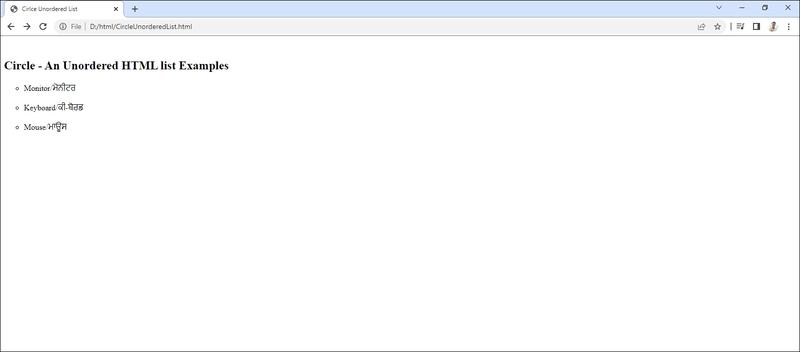
circle Sets the list item marker to a circle
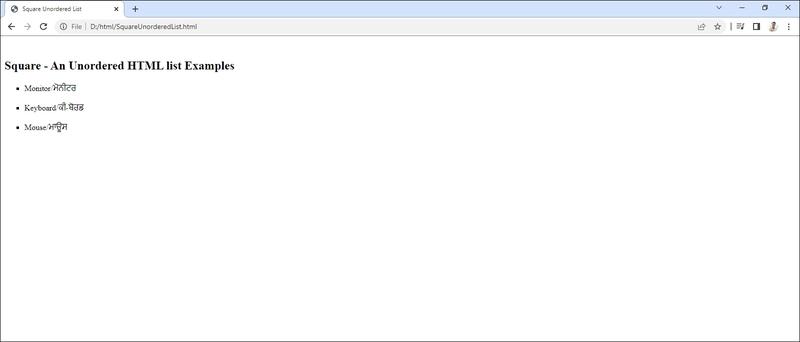
square Sets the list item marker to a square
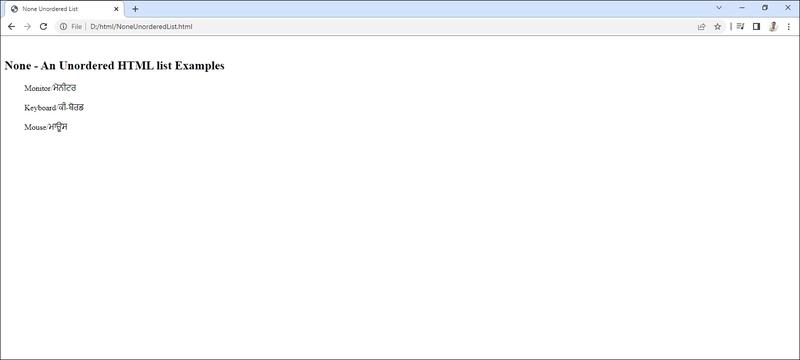
none The list items will not be marked

Circle Unordered List


Circle Unordered List

ਅਨਆਰਟਰ ਲਿਸਟ ਦੇ ਐਡੀਊਟਰ (Atributes of Urdered t ਜੇ ਅਸੀਂ ਅਨਆਰਡਰਡ ਲਿਸਟ ਲਈ ਬੁਲੇਟ ਦੀ ਕਿਸਮ ਨੂੰ ਬਦਲਣਾ ਚਾਹੁੰਦੇ ਹਾਂ, ਤਾਂ ਅਸੀਂ HTML ਡਾਕੂਮੈਂਟ ਵਿੱਚ <ul> ਰੋਗ ਦੀ Type ਐਟਰੀਬਿਊਟ ਦੀ ਵਰਤੋਂ ਕਰ ਸਕਦੇ ਹਾਂ। Type ਐਂਟਰੀਬਿਊਟ ਲਈ ਆਪਸ਼ਨਾਂ ਹੇਠਾਂ ਵਿਚ ਅਨੁਸਾਰ ਹੋ ਸਕਦੀਆਂ ਹਨ।

<ul type="square">

<ul type="disc">

<ul type = "circle">

ਮੂਲ ਰੂਪ (by default) ਵਿੱਚ ਡਿਸਕ (Disc) ਕਿਸਮ ਦੀਆਂ ਬੁਲੇਟਸ ਦੀ ਵਰਤੋਂ <ul> ਟੈਗ ਲਈ ਕੀਤੀ ਜਾਂਦੀ ਹੈ। ਹੇਠ ਦਿੱਤੀ ਉਦਾਹਰਣ ਵਿੱਚ ਦਿਖਾਇਆ ਗਿਆ ਹੈ ਕਿ ਕਿਸ ਤਰ੍ਹਾਂ ਅਸੀਂ HTML ਡਾਕੂਮੈਂਟ ਵਿੱਚ ਅਨਆਰਡਰਡ ਲਿਸਟ ਦੇ Type ਐਟਰੀਬਿਊਟ ਦੀ ਵਰਤੋਂ ਕਰਦੇ ਹੋਏ ਬੁਲੇਟ ਸਟਾਈਲ ਨੂੰ ਬਦਲ ਸਕਦੇ ਹਾਂ


Output


Live Demo & Try it yourself!

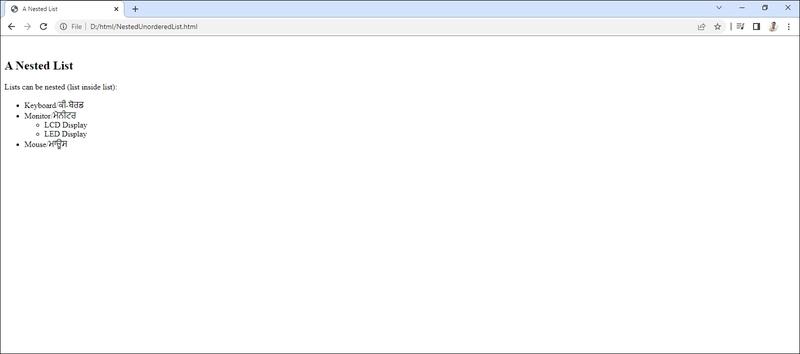
Nested HTML Lists


Nested HTML Lists

ਨੈਸਟਿਡ ਲਿਸਟਾਂ (Nesting of Lists): Lists can be nested (list inside list):

ਇੱਕ ਨੈਸਟਡ ਲਿਸਟ ਨੂੰ ਸਬ-ਲਿਸਟ (Sub-list) ਵਜੋਂ ਵੀ ਜਾਣਿਆ ਜਾਂਦਾ ਹੈ। ਇਹ HTML ਵਿੱਚ ਕਈ ਨਵੀਂ ਕਿਸਮ ਦੀ ਲਿਸਟ ਨਹੀਂ ਹੈ ਅਤੇ ਨਾ ਹੀ ਇਹਨਾਂ ਲਿਸਟਾਂ ਨੂੰ ਬਣਾਉਣ ਲਈ ਕਿਸੇ ਵਿਸ਼ੇਸ਼ ਟੈਗ ਦੀ ਵਰਤੋਂ ਕੀਤੀ ਜਾਂਦੀ ਹੈ। ਸਾਧਾਰਣ ਸ਼ਬਦਾਂ ਵਿੱਚ ਅਸੀਂ ਇਹ ਵੀ ਕਹਿ ਸਕਦੇ ਹਾਂ ਕਿ ਇਹ ਇੱਕ ਲਿਸਟ ਦੇ ਅੰਦਰ ਇੱਕ ਹੋਰ ਲਿਸਟ ਹੁੰਦੀ ਹੈ। ਸਬ-ਲਿਸਟ ਨੂੰ <> ਟੈਗ ਦੇ ਚਾਈਲਡ ਐਲੀਮੈਂਟ (Child Element) ਵੱਜੋਂ ਵਰਤਿਆ ਜਾਂਦਾ ਹੈ। ਅਸੀਂ ਵੱਖ- ਵੱਖਰੀਆਂ ਕਿਸਮਾਂ ਦੀਆਂ ਲਿਸਟਾਂ ਦੀ ਵਰਤੋਂ ਕਰਦੇ ਹੋਏ ਵੀ ਨੈਸਟਿਡ ਲਿਸਟਾਂ ਤਿਆਰ ਕਰ ਸਕਦੇ ਹਾਂ। HTML ਡਾਕੂਮੈਂਟਸ ਵਿੱਚ ਨੇਸਟਿਡ ਲਿਸਟਾਂ ਬਣਾਉਣ ਲਈ ਹੇਠ ਲਿਖੀ ਪ੍ਰਕਿਰਿਆ ਦੀ ਵਰਤੋਂ ਕੀਤੀ ਜਾ ਸਕਦੀ ਹੈ


Output


Live Demo & Try it yourself!

Horizontal List with CSS


Horizontal List with CSS

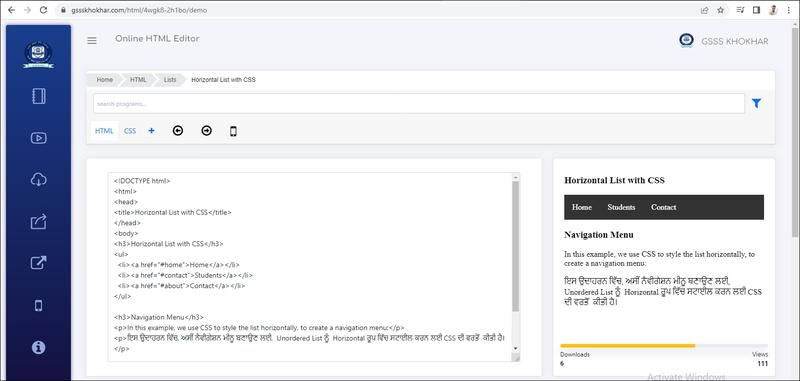
HTML lists can be styled in many different ways with CSS.

One popular way is to style a list horizontally, to create a navigation menu:


Output


Live Demo & Try it yourself!

Ordered HTML List


Ordered HTML List

Ordered HTML List

An ordered list starts with the <ol> tag. Each list item starts with the <li> tag.

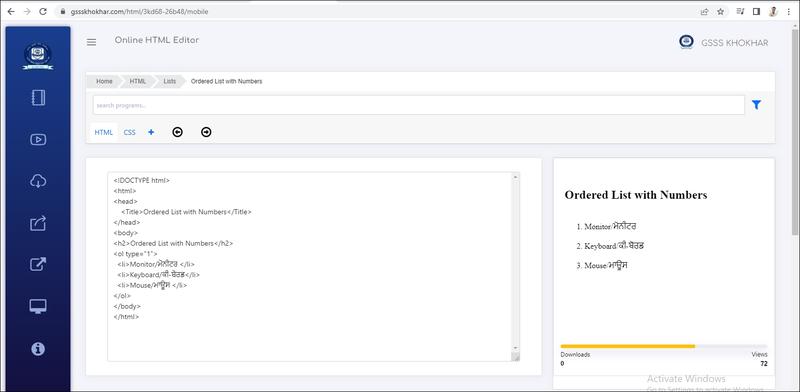
The list items will be marked with numbers by default:

ਆਰਡਰਡ ਲਿਸਟ : ਆਰਡਰਡ ਲਿਸਟਾਂ ਦੀ ਵਰਤੋ ਉਸ ਸਮੇਂ ਕੀਤੀ ਜਾਂਦੀ ਹੈ ਜਦੋਂ ਲਿਸਟ ਵਿੱਚ ਆਈਟਮਾਂ ਦਾ ਕ੍ਰਮ ਮਹੱਤਵ ਰੱਖਦਾ ਹੋਵੇ।ਇਸ ਲਿਸਟ ਨੂੰ ਨੰਬਰਡ ਲਿਸਟ ਵਜੋਂ ਵੀ ਜਾਣਿਆ ਜਾਂਦਾ ਹੈ ਕਿਉੰਕਿ ਇਹ ਲਿਸਟ ਆਈਟਮਾਂ ਨੂੰ ਸੰਖਿਆਤਮਕ ਕ੍ਰਮ ਵਿਚ ਦਰਸਾਉਂਦਾ ਹੈ।HTML ਡਾਕੂਮੈਂਟ ਵਿੱਚ ਇਸ ਕਿਸਮ ਦੀ ਲਿਸਟ ਬਣਾਉਣ ਲਈ <OL> ਟੈਗ ਦੀ ਵਰਤੋਂ ਕੀਤੀ ਜਾਂਦੀ ਹੈ।ਇੱਥੇ OL ਦਾ ਅਰਥ ਹੈ ਆਰਡਰਡ ਲਿਸਟ <OL> ਟੈਗ ਇੱਕ ਪੇਅਰਡ ਟੈਗ ਹੈ।ਇਸ ਲਿਸਟ ਦੀਆਂ ਸਾਰੀਆਂ ਆਈਟਮਾਂ <OL> ਅਤੇ </OL> ਟੈਗ ਦੇ ਵਿਚਕਾਰ ਰੱਖੀਆ ਜਾਂਦੀਆਂ ਹਨ। ਅਨਆਰਡਰਡ ਲਿਸਟ ਦੀ ਤਰ੍ਹਾਂ ਇਸ ਲਿਸਟ ਦੀ ਹਰ ਆਈਟਮ ਵੀ <LI> ਟੈਗ ਨਾਲ ਸ਼ੁਰੂ ਹੁੰਦੀ ਹੈ।


Output


Live Demo & Try it yourself!

Ordered HTML List - The Type Attribute

The type attribute of the <ol> tag, defines the type of the list item marker:

Type Description
type="1" The list items will be numbered with numbers (default)
type="A" The list items will be numbered with uppercase letters
type="a" The list items will be numbered with lowercase letters
type="I" The list items will be numbered with uppercase roman numbers
type="i" The list items will be numbered with lowercase roman numbers


Control List Counting

By default, an ordered list will start counting from 1. If you want to start counting from a specified number, you can use the start attribute:


Ordered List with Numbers


Ordered List with Numbers

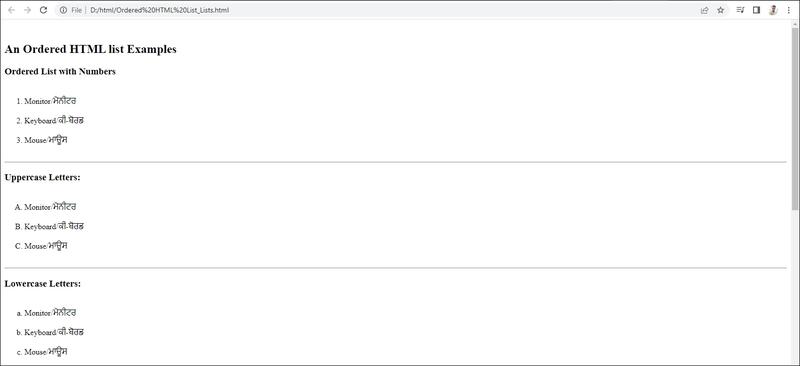
ਆਰਡਰਡ ਲਿਸਟ ਦੇ ਐਟਰੀਬਿਊਟਸ ( 111rites of Oriered List): ਅਸੀਂ ਆਰਡਰਡ ਲਿਸਟ ਵਿੱਚ ਲਿਸਟ ਆਈਟਮਾਂ ਦੇ ਕ੍ਰਮ ਨੂੰ ਦਰਸਾਉਣ ਲਈ ਸੰਖਿਆਤਮਕ ਕ੍ਰਮ (Numerical Order) ਜਾਂ ਵਰਣਮਾਲਾ ਦੇ ਕ੍ਰਮ (Alphabetic Order), ਜਾਂ ਕੋਈ ਵੀ ਅਜਿਹਾ ਫਾਰਮੈਟ ਜਿਸ ਨਾਲ ਕ੍ਰਮ ਨੂੰ ਦਰਸਾਇਆ ਜਾ ਸਕਦਾ ਹੈ, ਦੀ ਵਰਤੋਂ ਕਰ ਸਕਦੇ ਹਾਂ। ਆਰਡਰਡ ਲਿਸਟਾਂ ਵਿੱਚ ਲਿਸਟ ਦੇ ਕ੍ਰਮ ਦੀਆਂ ਵੱਖ- ਵੱਖਰੀਆਂ ਕਿਸਮਾਂ ਇਸ ਪ੍ਰਕਾਰ ਹੋ ਸਕਦੀਆਂ ਹਨ:

0 ਨੁਮੇਰਿਕ ਅੰਕਾਂ (Numeric Numbers) ਨਾਲ ਆਰਡਰਡ ਲਿਸਟ (1, 2, 3) ¤ ਵੱਡੇ ਰੋਮਨ ਅੰਕਾਂ (Capital Roman Numbers) ਨਾਲ ਆਰਡਰਡ ਲਿਸਟ (I II

III)

ਛੋਟੇ ਰੋਮਨ ਅੰਕਾਂ (Small Roman Numbers) ਨਾਲ ਆਰਡਰਡ ਲਿਸਟ (iiiiii)

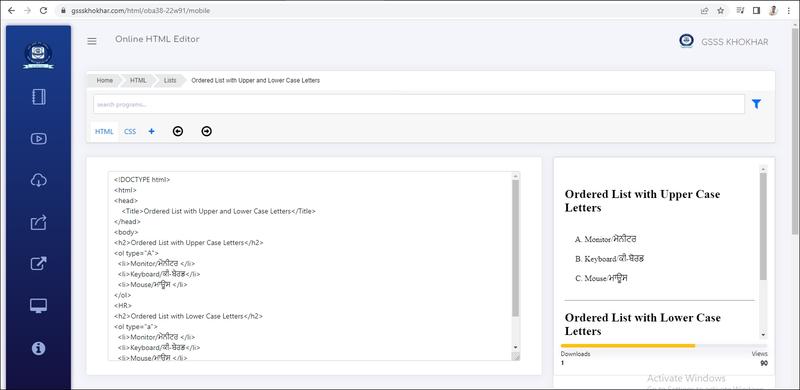
¤ ਅੰਗਰੇਜੀ ਦੇ ਵੱਡੇ ਅੱਖਰਾਂ (Capital Alphabets) ਨਾਲ ਆਰਡਰਡ ਲਿਸਟ (AB C)

¤ ਅੰਗਰੇਜੀ ਦੇ ਛੋਟੇ ਅੱਖਰਾਂ (Small Alphabets) ਨਾਲ ਆਰਡਰਡ ਲਿਸਟ (a b c)

ਅਸੀਂ <OL> ਟੈਗ ਵਿੱਚ Type ਐਟਰੀਬਿਊਟ ਦੀ ਵਰਤੋਂ ਕਰਦੇ ਹੋਏ ਕ੍ਰਮ ਦੀ ਕਿਸਮ ਬਦਲ ਸਕਦੇ ਹਾਂ। ਮੂਲ ਰੂਪ ਵਿੱਚ (By default) ਇਹ ਕ੍ਰਮ ਡੇਸੀਮਲ ਨੰਬਰਾਂ ਵਿੱਚ ਹੁੰਦਾ ਹੈ। ਆਰਡਰਡ ਲਿਸਟਾਂ ਵਿੱਚ ਨੰਬਰਾਂ ਦੇ ਫਾਰਮੈਟ ਨੂੰ ਬਦਲਨ ਲਈ Type ਐਂਟਰੀਬਿਊਟ ਦੀਆਂ ਸੰਭਾਵਿਤ ਆਪਸ਼ਨਾਂ ਹੇਠਾਂ ਦਿੱਤੇ ਅਨੁਸਾਰ ਹੋ ਸਕਦੀਆਂ ਹਨ:

<ol type = "1">

<ol type = "T">

ਇਹ ਅਪਰ-ਕੇਸ ਰੋਮਨ ਅੰਕਾਂ ਲਈ ਵਰਤਿਆ ਜਾਂਦਾ ਹੈ।

<ol type = "i">

<ol type = "A">

ਇਹ ਆਰਡਰਡ ਲਿਸਟ ਦਾ ਡਿਫਾਲਟ-ਨੰਬਰ ਫਾਰਮੇਟ ਹੁੰਦਾ ਹੈ।

ਇਹ ਲੰਅਰ-ਕੇਸ ਰੋਮਨ ਅੰਕਾਂ ਲਈ ਵਰਤਿਆ ਜਾਂਦਾ ਹੈ। ਇਹ ਅਪਰ-ਕੇਸ ਅੱਖਰਾਂ (Upper-Case Letters) ਲਈ ਵਰਤਿਆ

ਜਾਂਦਾ ਹੈ।

<ol type=""> ਇਹ ਲੋਅਰ-ਕੇਸ ਅੱਖਰਾਂ (Lower-Case Letters) ਲਈ ਵਰਤਿਆ

ਜਾਂਦਾ ਹੈ।

ਅਸੀਂ <OL> ਟੈਗ ਦੇ Start ਐਟਰੀਬਿਊਟ ਦੀ ਵਰਤੋਂ ਕਰਦੇ ਹੋਏ ਆਪਣੀ ਜ਼ਰੂਰਤ ਅਨੁਸਾਰ ਨੰਬਰਿੰਗ ਦੇ ਸ਼ੁਰੂਆਤੀ ਮੁੱਲ ਨੂੰ ਵੀ ਨਿਰਧਾਰਤ ਕਰ ਸਕਦੇ ਹਾਂ। ਉਦਾਹਰਣ ਲਈ: <ol type = "1" start = "5" > ਨਾਲ ਲਿਸਟ ਆਈਟਮਾਂ ਦਾ ਕ੍ਰਮ ਰੋਮਨ ਅੰਕ 'v' ਤੋਂ ਸ਼ੁਰੂ ਕੀਤਾ ਜਾ ਸਕਦਾ ਹੈ। ਹੇਠਾਂ ਦਿੱਤੇ HTML ਪ੍ਰਗਰਾਮ ਵਿੱਚ Type ਅਤੇ Start ਐਟਰੀਬਿਊਟਸ ਦੇ ਨਾਲ ਆਰਡਰਡ ਲਿਸਟ ਦੀ ਵਰਤੋਂ ਨੂੰ ਦਰਸਾਇਆ ਗਿਆ ਹੈ


Output


Live Demo & Try it yourself!

Ordered List with Upper and Lower Case Letters


Ordered List with Upper and Lower Case Letters


Output


Live Demo & Try it yourself!

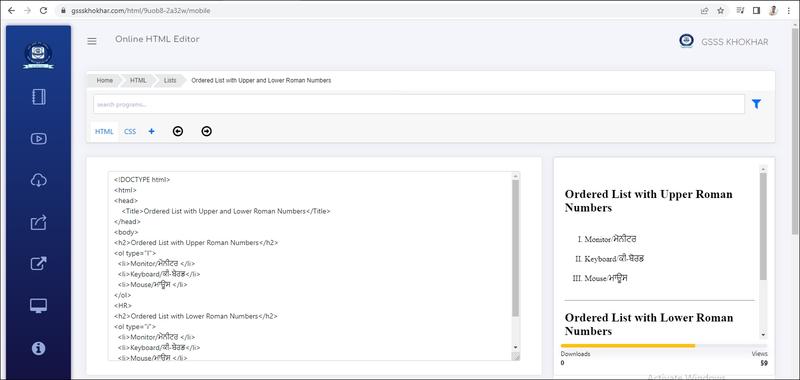
Ordered List with Upper and Lower Roman Numbers


Ordered List with Upper and Lower Roman Numbers


Output


Live Demo & Try it yourself!

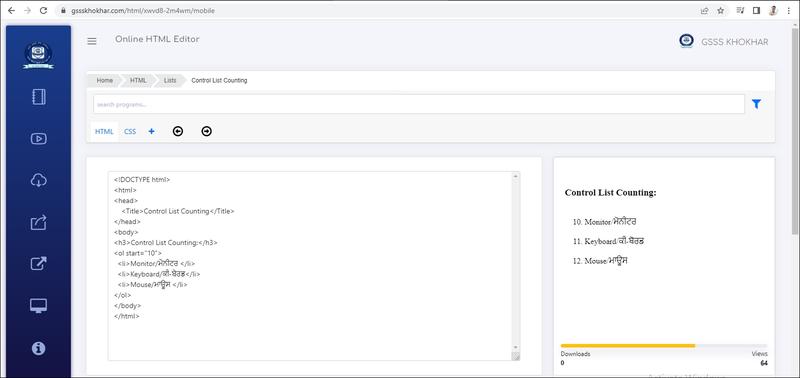
Control List Counting


Control List Counting

By default, an ordered list will start counting from 1. If you want to start counting from a specified number, you can use the start attribute:


Output


Live Demo & Try it yourself!

<h2>The start attribute</h2>
<p>By default, an ordered list will start counting from 1. Use the start attribute to start counting from a specified number:</p>

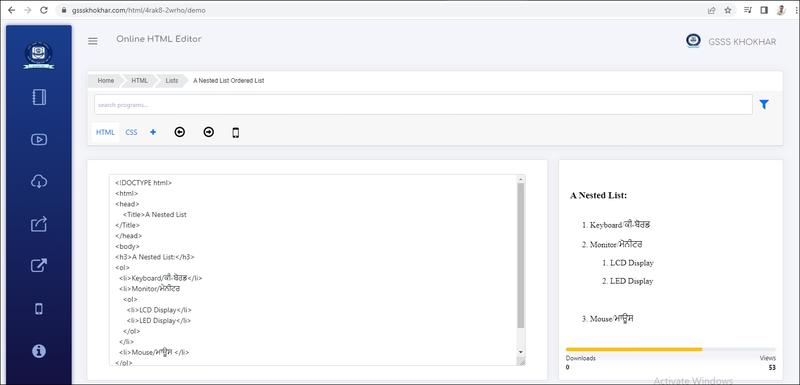
A Nested List Ordered List


A Nested List Ordered List

ਨੈਸਟਿਡ ਲਿਸਟਾਂ (Nesting of Lists): Lists can be nested (list inside list):

ਇੱਕ ਨੈਸਟਡ ਲਿਸਟ ਨੂੰ ਸਬ-ਲਿਸਟ (Sub-list) ਵਜੋਂ ਵੀ ਜਾਣਿਆ ਜਾਂਦਾ ਹੈ। ਇਹ HTML ਵਿੱਚ ਕਈ ਨਵੀਂ ਕਿਸਮ ਦੀ ਲਿਸਟ ਨਹੀਂ ਹੈ ਅਤੇ ਨਾ ਹੀ ਇਹਨਾਂ ਲਿਸਟਾਂ ਨੂੰ ਬਣਾਉਣ ਲਈ ਕਿਸੇ ਵਿਸ਼ੇਸ਼ ਟੈਗ ਦੀ ਵਰਤੋਂ ਕੀਤੀ ਜਾਂਦੀ ਹੈ। ਸਾਧਾਰਣ ਸ਼ਬਦਾਂ ਵਿੱਚ ਅਸੀਂ ਇਹ ਵੀ ਕਹਿ ਸਕਦੇ ਹਾਂ ਕਿ ਇਹ ਇੱਕ ਲਿਸਟ ਦੇ ਅੰਦਰ ਇੱਕ ਹੋਰ ਲਿਸਟ ਹੁੰਦੀ ਹੈ। ਸਬ-ਲਿਸਟ ਨੂੰ <> ਟੈਗ ਦੇ ਚਾਈਲਡ ਐਲੀਮੈਂਟ (Child Element) ਵੱਜੋਂ ਵਰਤਿਆ ਜਾਂਦਾ ਹੈ। ਅਸੀਂ ਵੱਖ- ਵੱਖਰੀਆਂ ਕਿਸਮਾਂ ਦੀਆਂ ਲਿਸਟਾਂ ਦੀ ਵਰਤੋਂ ਕਰਦੇ ਹੋਏ ਵੀ ਨੈਸਟਿਡ ਲਿਸਟਾਂ ਤਿਆਰ ਕਰ ਸਕਦੇ ਹਾਂ। HTML ਡਾਕੂਮੈਂਟਸ ਵਿੱਚ ਨੇਸਟਿਡ ਲਿਸਟਾਂ ਬਣਾਉਣ ਲਈ ਹੇਠ ਲਿਖੀ ਪ੍ਰਕਿਰਿਆ ਦੀ ਵਰਤੋਂ ਕੀਤੀ ਜਾ ਸਕਦੀ ਹੈ


Output


Live Demo & Try it yourself!

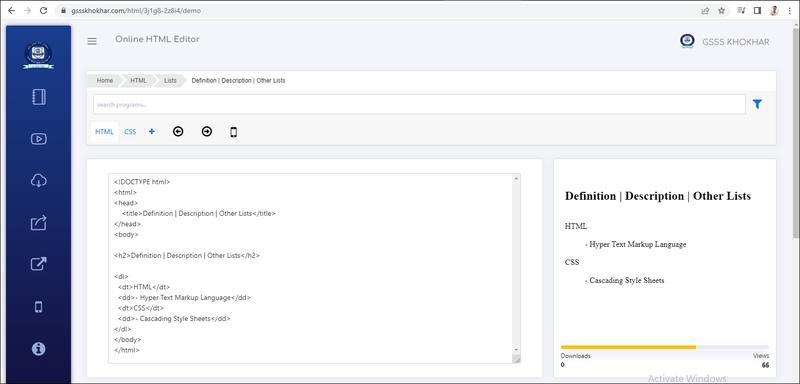
Definition | Description | Other Lists


Definition | Description | Other Lists

HTML Definition/Description/Other Lists

A description list is a list of terms, with a description of each term.

The <dl> tag defines the description list, the <dt> tag defines the term (name), and the <dd> tag describes each term:

A (Definition List) ਜਾਂ ਡਿਸਕ੍ਰਿਪਸ਼ਨ ਲਿਸਟ/ਵਰਣਨ ਸੂਚੀ (Description List) ਵੀ ਕਿਹਾ ਜਾਂਦਾ ਹੈ। : ਡੇਫੀਨੇਸ਼ਨ ਲਿਸਟ ਹਰੇਕ ਆਈਟਮ ਜਾਂ ਸ਼ਬਦ ਦੇ ਵਰਣਨ ਜਾਂ ਪਰਿਭਾਸ਼ਾ ਨੂੰ ਦਰਸ਼ਾਉਂਦੀ ਹੋਈ ਵੱਖ-ਵੱਖ ਆਈਟਮਾਂ ਦੀ --- । ਇੱਕ ਲਿਫ਼ ਹੁੰਦੀ ਹੈ। ਇਸ ਲਿਸਟ ਵਿੱਚ ਆਈਟਮਾਂ ਨੂੰ ਇੱਕ ਸ਼ਬਦਕੋਸ਼ (Dictionary) ਦੀ ਤਰ੍ਹਾਂ ਸੂਚੀਬੱਧ (Listed । । ਕੀਤਾ ਗਿਆ ਹੁੰਦਾ ਹੈ। HTML ਵਿੱਚ <DL> ਟੈਗ ਦੀ ਵਰਤੋਂ ਡੈਫੀਨੇਸ਼ਨ ਲਿਸਟ ਤਿਆਰ ਕਰਨ ਲਈ ਕੀਤੀ ਜਾਂਦੀ ਹੈ। ਡੇਵੀਨੇਸ਼ਨ ਲਿਸਟ ਵਿੱਚ ਹਰੇਕ ਲਿਸਟ ਆਈਟਮ ਵਿੱਚ ਦੋ ਤਰ੍ਹਾਂ ਦੇ ਕੰਟੈਂਟ ਦਾਖਲ ਕੀਤੇ ਜਾਂਦੇ ਹਨ,

• ਡੇਫੀਨੇਸ਼ਨ ਟਾਈਟਲ/ਪਰਿਭਾਸ਼ਾ ਸਿਰਲੇਖ (Definition Title): ਇਸ ਨੂੰ ਡਾਟਾ ਟਰਮ (Data Term) ਵੀ ਕਿਹਾ ਜਾ ਸਕਦਾ ਹੈ। ਡੇਫੀਨੇਸ਼ਨ ਟਾਈਟਲ ਲਈ <DI> ਟੈਗ ਦੀ ਵਰਤੋਂ ਕੀਤੀ ਜਾਂਦੀ ਹੈ? ਡੈਫੀਨੇਸ਼ਨ ਡਿਸਕ੍ਰਿਪਸ਼ਨ/ਪਰਿਭਾਸ਼ਾ ਵਰਣਨ (Definition Description): ਇਸ ਨੂੰ ਡਾਟਾ ਡੇਵੀਨੇਸ਼ਨ (Data Definition) ਵੀ ਕਿਹਾ ਜਾ ਸਕਦਾ ਹੈ। ਡੇਫੀਨੇਸ਼ਨ ਡਿਸਕ੍ਰਿਪਸ਼ਨ ਲਈ <DD> ਟੈਗ ਦੀ ਵਰਤੋਂ ਕੀਤੀ ਜਾਂਦੀ

<DT > ਅਤੇ <DD> ਟੈਗਜ਼ ਦੀ ਵਰਤੋਂ <DI> ਅਤੇ </DL> ਟੈਗਜ਼ ਦੇ ਵਿੱਚਕਾਰ ਕੀਤੀ ਜਾਂਦੀ ਹੈ। <DI> ਟੈਗ ਨਾਲ ਕਿਸੇ ਐਟਰੀਬਿਊਟ ਦੀ ਵਰਤੋਂ ਨਹੀਂ ਕੀਤੀ ਜਾਂਦੀ।


Output


Live Demo & Try it yourself!

  • Use the HTML <dl> element to define a description list
  • Use the HTML <dt> element to define the description term
  • Use the HTML <dd> element to describe the term in a description list