

Creating an HTML Table


Creating an HTML Table

HTML Tables

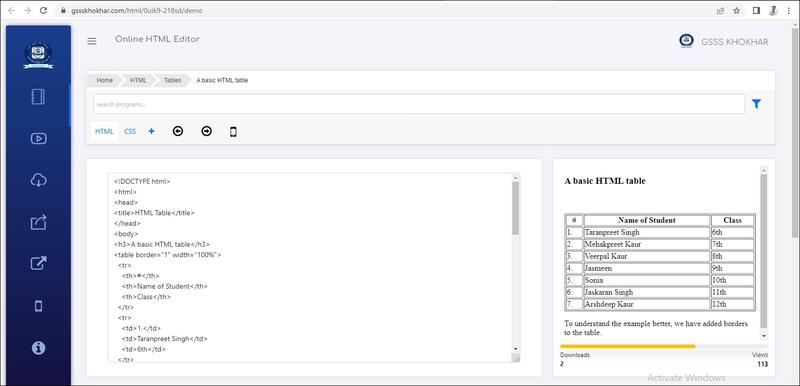
HTML tables allow web developers to arrange data into rows and columns.

Table Cells

Each table cell is defined by a <td> and a </td> tag.

td stands for table data.

Everything between <td> and </td> are the content of the table cell.

ਟੇਬਲ ਇੱਕ ਅਜਿਹੀ ਬਣਤਰ (Structure) ਹੁੰਦਾ ਹੈ ਜਿਸ ਵਿੱਚ ਡਾਟਾ ਨੂੰ ਰੋਅਜ਼ (Rows) ਅਤੇ ਕਾਲਮਾਂ (Columns) ਵਿੱਚ ਵਿਵਸਥਿਤ ਕੀਤੀ ਜਾਂਦਾ ਹੈ। ਟੇਬਲਾਂ ਦੀ ਜ਼ਿਆਦਾਤਰ ਵਰਤੋਂ ਡਾਟਾ ਨੂੰ ਟੇਬਲ ਦੇ ਰੂਪ (Tabular Form) ਵਿੱਚ ਪ੍ਰਸਤੁੱਤ ਕਰਨ ਲਈ ਕੀਤਾ ਜਾਂਦਾ ਹੈ ਤਾਂ ਕਿ ਡਾਟਾ ਦਾ ਵਿਸ਼ਲੇਸ਼ਣ (Data Analysis) ਅਤੇ ਖੋਜ ਕਾਰਜਾਂ (Research Work) ਆਦਿ ਨਾਲ ਸੰਬੰਧਤ ਕੰਮ ਆਸਾਨੀ ਨਾਲ ਕੀਤੇ ਜਾ ਸਕਣ। ਟੇਬਲ ਵਿੱਚ ਦਰਸਾਈ ਗਈ ਜਾਣਕਾਰੀ ਅਸਾਨੀ ਨਾਲ ਪੜ੍ਹਨਯੋਗ (Readable) ਅਤੇ ਸਮਝਣ ਯੋਗ (Understandable) ਹੁੰਦੀ ਹੈ। ਟੇਬਲਜ਼ ਲੰਮੀ (Lengthy) ਅਤੇ ਵਿਆਪਕ (Extensive) ਜਾਣਕਾਰੀ ਨੂੰ ਕੰਪਾਈਲ ਕਰਨ ਦਾ ਇੱਕ ਵਧੀਆ ਢੰਗ ਪ੍ਰਦਾਨ ਕਰਦੇ ਹਨ। ਸਾਰੇ ਪ੍ਰਸਿੱਧ ਵੈੱਬ-ਬਾਉਜ਼ਰ ਟੇਬਲਾਂ ਨੂੰ ਸਪੋਰਟ (Support) ਪ੍ਰਦਾਨ ਕਰਦੇ ਹਨ।

HTML ਟੇਬਲ ਵੈੱਬ ਲੇਖਕਾਂ (Web Authors) ਨੂੰ ਟੈਕਸਟ, ਤਸਵੀਰਾਂ, ਲਿੰਕ ਆਦਿ ਵਰਗੇ ਡਾਟਾ ਨੂੰ ਰੋਅਜ਼ ਅਤੇ ਕਾਲਮਾਂ ਵਿੱਚ ਵਿਵਸਥਿਤ ਕਰਨ ਦੀ ਆਗਿਆ ਦਿੰਦੇ ਹਨ। ਰੋਅਜ਼ ਅਤੇ ਕਾਲਮਾਂ ਦੇ ਅੰਤਰ-ਵਿਭਾਗੀ (Cross- Sectional) ਖੇਤਰ ਨੂੰ ਸੈੱਲ ਕਿਹਾ ਜਾਂਦਾ ਹੈ। ਇਨ੍ਹਾਂ ਸੈੱਲਾਂ ਵਿੱਚ ਟੇਬਲ ਦੇ ਕੰਟੈਂਟਸ ਦਿਖਾਏ ਜਾਂਦੇ ਹਨ। HTML ਡਾਕੂਮੈਂਟਸ ਵਿੱਚ ਟੇਬਲ ਦੇ ਨਾਲ ਕੰਮ ਕਰਨ ਲਈ ਹੇਠ ਲਿਖੇ ਟੈਗਜ਼ ਦੀ ਵਰਤੋਂ ਕੀਤੀ ਜਾਂਦੀ ਹੈ

<TABLE> : HTML ਡਾਕੂਮੈਂਟ ਵਿੱਚ ਇੱਕ ਟੇਬਲ ਬਣਾਉਣ ਲਈ <TABLE> ਟੈਗ ਦੀ ਵਰਤੋਂ ਕੀਤੀ ਜਾਂਦੀ ਹੈ। ਇਹ ਇੱਕ ਪੇਅਰਡ ਕੰਟੇਨਰ ਟੈਗ ਹੈ। ਹਰੇਕ <table> ਟੈਗ ਨਾਲ ਸ਼ੁਰੂ ਹੋਣਾ ਚਾਹੀਦਾ ਹੈ ਅਤੇ <TABLE> ਟੰਗ ਨਾਲ ਖਤਮ ਹੋਣਾ ਚਾਹੀਦਾ ਹੈ। ਡਾਟਾ ਸਮੇਤ ਸਾਰੀਆਂ ਰੋਅਜ਼ ਅਤੇ ਕਾਲਮਜ਼ <TABLE>...<TABLE> ਟੈਗਜ਼ ਦੇ ਵਿਚਕਾਰ ਪਰਿਭਾਸ਼ਤ ਕੀਤੇ ਜਾਂਦੇ ਹਨ।

<TR> : TR ਦਾ ਅਰਥ ਹੈ ਟੇਬਲ ਰੋਅ (Table Row)। ਇਹ ਟੈਗ <table> ਵਿੱਚ ਇੱਕ ਕਤਾਰ/ਰੋਅ (Row) ਨੂੰ ਪਰਿਭਾਸ਼ਤ ਕਰਨ ਲਈ ਵਰਤਿਆ ਜਾਂਦਾ ਹੈ। ਇਹ ਟੈਗ ਵੀ ਇੱਕ ਪੇਅਰਡ/ਕੰਟੇਨਰ ਟੈਗ ਹੈ। ਟੇਬਲ ਦੀ ਹਰ ਰੇਅ <TR> ਟੈਗ ਨਾਲ ਸ਼ੁਰੂ ਹੁੰਦੀ ਹੈ ਅਤੇ </TR> ਟੈਗ ਨਾਲ ਖਤਮ ਹੁੰਦੀ ਹੈ। ਟੇਬਲ ਹੈਡਿੰਗ (<TH>) ਅਤੇ ਟੇਬਲ ਡਾਟਾ (<ID>) ਨੂੰ <TR> ਅਤੇ <TR> ਟੈਗਸ ਵਿਚਕਾਰ ਪਰਿਭਾਸ਼ਤ ਕੀਤਾ ਜਾਂਦਾ ਹੈ। ਟੇਬਲ ਦੀ ਹਰੇਕ ਰੋਅ ਲਈ ਇੱਕ ਵੱਖਰਾ <TR> ... <TR> ਟੈਗ <TABLE> ਟੈਗ ਵਿੱਚ ਪਰਿਭਾਸ਼ਤ ਕੀਤਾ ਜਾਂਦਾ ਹੈ।

<TH> :TH ਦਾ ਅਰਥ ਹੈ ਟੇਬਲ ਹੈਡਿੰਗ (Table Heading)। ਇਹ ਟੈਗ ਟੇਬਲ ਹੈਡਿੰਗਜ਼ (ਕਾਲਮਾਂ ਦੇ ਨਾਂ) ਨੂੰ ਪਰਿਭਾਸ਼ਤ ਕਰਨ ਲਈ ਵਰਤਿਆ ਜਾਂਦਾ ਹੈ। ਇਹ ਵੀ ਇੱਕ ਪੇਅਰਡ/ਕੰਟੇਨਰ ਟੈਗ ਹੈ ਜੋ <TH> ਟੈਗ ਨਾਲ ਸ਼ੁਰੂ ਹੁੰਦਾ ਹੈ ਅਤੇ </TH> ਟੈਗ ਨਾਲ ਖਤਮ ਹੁੰਦਾ ਹੈ। ਹਰੇਕ ਟੇਬਲ ਹੈਡਿੰਗ (ਕਾਲਮ ਦੇ ਨਾਂ) ਲਈ <TH TH> ਟੈਗਜ਼ ਦਾ ਇੱਕ ਵੱਖਰਾ ਸੁਮੇਲ (Combination) ਵਰਤਿਆ ਜਾਂਦਾ ਹੈ। ਇਹ ਟੈਗਜ਼ <TR> ਅਤੇ TRS ਟੈਗਜ਼ ਦੇ ਵਿਚਕਾਰ ਪਰਿਭਾਸ਼ਤ ਹੋਣ ਚਾਹੀਦੇ ਹਨ। ਆਮ ਤੌਰ 'ਤੇ ਅਸੀਂ ਟੇਬਲ ਦੀ ਸਿਖਰਲੀ ਡੇਅ (Top Row) ਨੂੰ ਟੇਬਲ ਹੈਡਿੰਗ ਵਜੋਂ ਵਰਤਦੇ ਹਾਂ, ਪਰ ਅਸੀਂ ਕਿਸੇ ਵੀ ਰੋਅ ਵਿੱਚ ਮ> ਟੈਗਜ਼ ਦੀ ਵਰਤ ਕਰ ਸਕਦੇ ਹਾਂ। ਮੂਲ ਰੂਪ ਵਿੱਚ (By default) ਟੇਬਲ ਹੈਡਿੰਗਜ਼ ਬੋਲਡ ਅਤੇ ਸੈੱਲ ਦੇ ਸੈਂਟਰ ਵਿੱਚ ਦਿਖਾਈ ਦਿੰਦੇ ਹਨ।

<TD> : TD ਦਾ ਅਰਥ ਹੈ ਟੇਬਲ ਡਾਟਾ (Table Data) । ਇਹ ਟੈਗ ਸੈੱਲ ਦੇ ਕੰਟੇਂਟਸ/ਡਾਟਾ ਨੂੰ ਪਰਿਭਾਸ਼ਤ ਕਰਨ ਲਈ ਵਰਤਿਆ ਜਾਂਦਾ ਹੈ। ਇਹ ਵੀ ਇੱਕ ਪੇਅਰਡ/ਕੰਟੇਨਰ ਟੈਗ ਹੈ। ਸੈਲ ਕੰਟੈਂਟ/ਡਾਟਾ ਨੂੰ <TD> ਅਤੇ /TD> ਟੈਗਜ਼ ਵਿਚਕਾਰ ਪਰਿਭਾਸ਼ਤ ਕੀਤਾ ਜਾਂਦਾ ਹੈ। ਇਹ ਟੈਗਜ਼ <TR> ਅਤੇ </TR> ਟੈਗਜ਼ ਦੇ ਵਿਚਕਾਰ ਪਰਿਭਾਸ਼ਤ ਹੋਣੇ ਚਾਹੀਦੇ ਹਨ। <TD> ਟੈਗ ਦੁਆਰਾ ਪਰਿਭਾਸ਼ਿਤ ਕੀਤੇ ਕੰਟੈਂਟ ਨਿਯਮਿਤ (Regular) ਅਤੇ ਮੂਲ ਰੂਪ ਵਿੱਚ (By default) ਸੈੱਲ ਦੇ ਖੱਬੇ ਪਾਸੇ ਵੱਲ ਅਲਾਈਨ (Left:Aligned) ਹੁੰਦੇ ਹਨ।

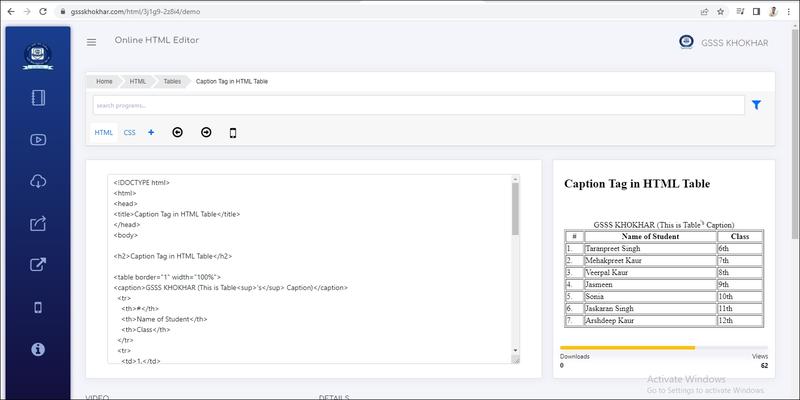
<CAPTION> : <CAPTION> ਟੈਗ ਟੇਬਲ ਦੇ ਟਾਈਟਲ (Title) ਜਾਂ ਵਿਆਖਿਆ (Explanatics) ਵਜੋਂ ਕੰਮ ਕਰਦਾ ਹੈ। ਇਹ ਟੇਬਲ ਦੇ ਉੱਪਰਲੇ ਪਾਸੇ ਦਿਖਾਈ ਦਿੰਦਾ ਹੈ। ਮੂਲ ਰੂਪ ਵਿੱਚ ਇੱਕ ਟੇਬਲ ਟਾਈਟਲ ਸੈਂਟਰ-ਅਲਾਈਨਡ ਹੁੰਦਾ ਹੈ। <CAPTION> ਟੈਗ <TABLE> ਟੈਗ ਸ਼ੁਰੂ ਕਰਨ ਦੇ ਤੁਰੰਤ ਬਾਅਦ ਲਿਖਿਆ ਜਾਣਾ ਚਾਹੀਦਾ ਹੈ। ਇਹ ਟੈਗ ਟੇਬਲ ਨੂੰ ਪਰਿਭਾਸ਼ਤ ਕਰਨ ਲਈ ਲਾਜ਼ਮੀ ਨਹੀਂ ਹੁੰਦਾ; ਜੇਕਰ ਅਸੀਂ ਟੇਬਲ ਲਈ ਕਿਸੇ ਟਾਈਟਲ ਨੂੰ ਪਰਿਭਾਸ਼ਤ ਕਰਨਾ ਚਾਹੁੰਦੇ ਹਾਂ ਸਿਰਫ ਤਾਂ ਹੀ ਅਸੀਂ ਇਸ ਟੈਗ ਦੀ ਵਰਤੋਂ ਕਰਾਂਗੇ। ਹੇਠਾਂ ਇੱਕ ਸਧਾਰਨ ਟੇਬਲ ਦੀ ਉਦਾਹਰਣ ਦਿੱਤੀ ਗਈ ਹੈ:


Output


Live Demo & Try it yourself!
Caption Tag in HTML Table


Caption Tag in HTML Table

<CAPTION> : <CAPTION> ਟੈਗ ਟੇਬਲ ਦੇ ਟਾਈਟਲ (Title) ਜਾਂ ਵਿਆਖਿਆ (Explanatics) ਵਜੋਂ ਕੰਮ ਕਰਦਾ ਹੈ। ਇਹ ਟੇਬਲ ਦੇ ਉੱਪਰਲੇ ਪਾਸੇ ਦਿਖਾਈ ਦਿੰਦਾ ਹੈ। ਮੂਲ ਰੂਪ ਵਿੱਚ ਇੱਕ ਟੇਬਲ ਟਾਈਟਲ ਸੈਂਟਰ-ਅਲਾਈਨਡ ਹੁੰਦਾ ਹੈ। <CAPTION> ਟੈਗ <TABLE> ਟੈਗ ਸ਼ੁਰੂ ਕਰਨ ਦੇ ਤੁਰੰਤ ਬਾਅਦ ਲਿਖਿਆ ਜਾਣਾ ਚਾਹੀਦਾ ਹੈ। ਇਹ ਟੈਗ ਟੇਬਲ ਨੂੰ ਪਰਿਭਾਸ਼ਤ ਕਰਨ ਲਈ ਲਾਜ਼ਮੀ ਨਹੀਂ ਹੁੰਦਾ; ਜੇਕਰ ਅਸੀਂ ਟੇਬਲ ਲਈ ਕਿਸੇ ਟਾਈਟਲ ਨੂੰ ਪਰਿਭਾਸ਼ਤ ਕਰਨਾ ਚਾਹੁੰਦੇ ਹਾਂ ਸਿਰਫ ਤਾਂ ਹੀ ਅਸੀਂ ਇਸ ਟੈਗ ਦੀ ਵਰਤੋਂ ਕਰਾਂਗੇ। ਹੇਠਾਂ ਇੱਕ ਸਧਾਰਨ ਟੇਬਲ ਦੀ ਉਦਾਹਰਣ ਦਿੱਤੀ ਗਈ ਹੈ:


Output


Live Demo & Try it yourself!
Setting Table Height and Width


Setting Table Height and Width

ਟੇਬਲ ਦੀ ਉਚਾਈ ਅਤੇ ਚੌੜਾਈ ਸੈੱਟ ਕਰਨਾ (Setting Table Height and Width):

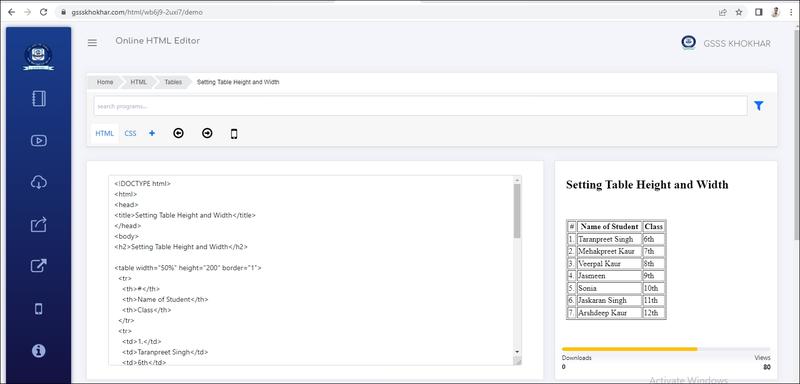
ਅਸੀਂ <table> ਟੈਗ ਦੇ width ਅਤੇ height ਐਟਰੀਬਿਊਟ ਦੀ ਵਰਤੋਂ ਕਰਦੇ ਹੋਏ ਟੇਬਲ ਦੀ ਚੌੜਾਈ ਅਤੇ ਉਹ ਨਿਰਧਾਰਤ ਕਰ ਸਕਦੇ ਹਾਂ। ਟੇਬਲ ਦੀ ਚੌੜਾਈ ਜਾਂ ਉਚਾਈ ਨੂੰ ਪਿਕਸਲਾਂ (pixels) ਦੇ ਰੂਪ ਵਿੱਚ ਜਾਂ ਉਪਲਬਧ ਖੇਤਰ ਦੇ ਤੀਸ਼ਤ ਰੂਪ ( Percentage of available screen area) ਵਿੱਚ ਨਿਰਧਾਰਤ ਕੀਤਾ ਜਾ ਸਕਦਾ ਹੈ।

ਉਦਾਹਰਣ ਲਈ: <table width="50%" height="200">.......</table> ਇਸ ਉਦਾਹਰਣ ਅਨੁਸਾਰ ਵੈੱਬ ਬ੍ਰਾਉਜ਼ਰ ਵਿੰਡੋ ਦੀ 50% ਜਗ੍ਹਾ ਟੇਬਲ ਦੀ ਚੌੜਾਈ ਦੇ ਤੌਰ ਤੇ ਵਰਤੀ ਜਾਵੇਗੀ, ਜਦੋਂ ਕਿ ਟੇਬਲ ਦੀ ਉਚਾਈ ਨੂੰ 200 ਪਿਕਸਲ ਸੈੱਟ ਕੀਤਾ ਗਿਆ ਹੈ।


Output


Live Demo & Try it yourself!
Setting Table Border and Border Color


Setting Table Border and Border Color

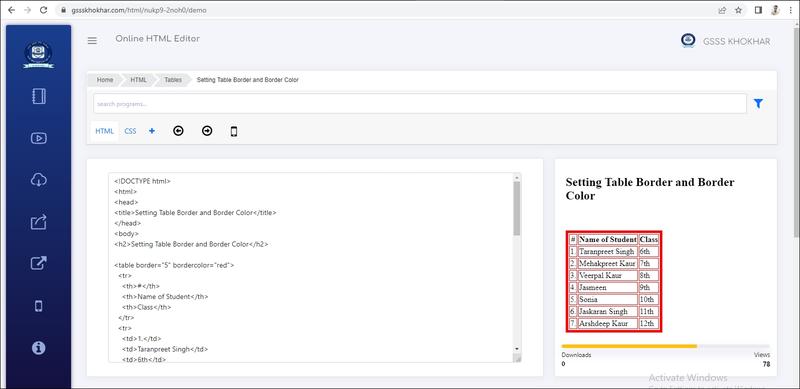
ਮੂਲ ਰੂਪ ਵਿੱਚ HTML ਟੇਬਲ ਲਈ ਕੋਈ ਬਾਰਡਰ ਸੈੱਟ ਨਹੀਂ ਕੀਤਾ ਜਾਂਦਾ। ਇਹ <table› ਟੈਗ ਦਾ Border ਐਟਰੀਬਿਊਟ ਹੈ ਜੋ ਸਾਰੇ ਸੈੱਲਾਂ ਦਾ ਬਾਰਡਰ ਸੈੱਟ ਕਰਨ ਲਈ ਵਰਤਿਆ ਜਾਂਦਾ ਹੈ। ਬਾਰਡਰ ਦੀ ਚੌੜਾਈ ਨੰਬਰਾਂ ਵਿੱਚ ਨਿਰਧਾਰਤ ਕੀਤੀ ਜਾਂਦੀ ਹੈ। ਉਦਾਹਰਣ ਲਈ ਇੱਕ ਪਤਲਾ ਬਾਰਡਰ ਸੈੱਟ ਕਰਨ ਲਈ Border ਅੰਟਰੀਬਿਊਟ ਦਾ ਮੁੱਲ 1 ਸੈੱਟ ਕੀਤਾ ਜਾਵੇਗਾ। ਬਾਰਡਰ ਦੀ ਮੋਟਾਈ ਵਧਾਉਣ ਲਈ '1' ਤੇ ਵੱਡੇ ਨੰਬਰ ਦੀ ਵਰਤੋਂ ਕੀਤੀ ਜਾ ਸਕਦੀ ਹੈ। ਜੇਕਰ ਟੇਬਲ ਬਾਰਡਰ ਲਈ horder = "0" ਦੀ ਵਰਤੋਂ ਕੀਤੀ ਜਾਂਦੀ ਹੈ ਤਾਂ ਟੇਬਲ ਬਾਰਡਰ ਦਿਖਾਈ ਨਹੀਂ ਦੇਵੇਗਾ।

ਉਦਾਹਰਣ ਲਈ, <ableborder="5">.......table>

ਇਸ ਉਦਾਹਰਨ ਵਿੱਚ, ਇੱਕ ਟੇਬਲ ਦਾ ਮੋਟਾ ਬਾਰਡਰ ਸੈੱਟ ਕੀਤਾ ਗਿਆ ਹੈ ਕਿਉਂਕਿ ਬਾਰਡਰ ਦਾ ਮੁੱਲ 5 ਸੈੱਟ ਕੀਤਾ

ਗਿਆ ਹੈ ਜੋ ਕਿ 1 ਤੋਂ ਵੱਧ ਹੈ। ਟੇਬਲ ਬਾਰਡਰ ਦਾ ਰੰਗ ਬਦਲਣ ਲਈ BorderColor ਐਂਟਰੀਬਿਊਟ ਵਰਤਿਆ ਜਾ ਸਕਦਾ ਹੈ। ਬਾਰਡਰ ਦਾ ਰੰਗ ਉਸ ਸਮੇਂ ਹੀ ਦਿਖਾਈ ਦੇਵੇਗਾ ਜਦੋਂ ਬਾਰਡਰ ਦਾ ਮੁੱਲ "1" ਜਾਂ ਇਸਤੋਂ ਵੱਧ ਸੋਟ ਕੀਤਾ ਗਿਆ ਹੋਵੇ।

ਉਦਾਹਰਣ ਲਈ, <able border="1" bordercolor="red">.......</table>

ਇਸ ਉਦਾਹਰਣ ਵਿੱਚ ਟੇਬਲ ਉੱਪਰ ਇੱਕ ਪਤਲੇ ਬਾਰਡਰ ਨੂੰ ਲਾਲ ਰੰਗ ਨਾਲ ਪਰਿਭਾਸ਼ਤ ਕੀਤਾ ਗਿਆ ਹੈ। ਹੇਠਾਂ ਦਿੱਤੀ HTML ਪ੍ਰੋਗਰਾਮ ਦੀ ਉਦਾਹਰਣ ਟੇਬਲ ਦੇ ਉਹਨਾਂ ਐਟਰੀਬਿਊਟ ਦੀ ਵਰਤੋਂ ਨੂੰ ਦਰਸਾਉਂਦੀ ਹੈ ਜਿਹਨਾਂ ਦੀ ਹੁਣ ਤੱਕ ਵਿਆਖਿਆ ਕੀਤੀ ਗਈ ਹੈ:


Output


Live Demo & Try it yourself!
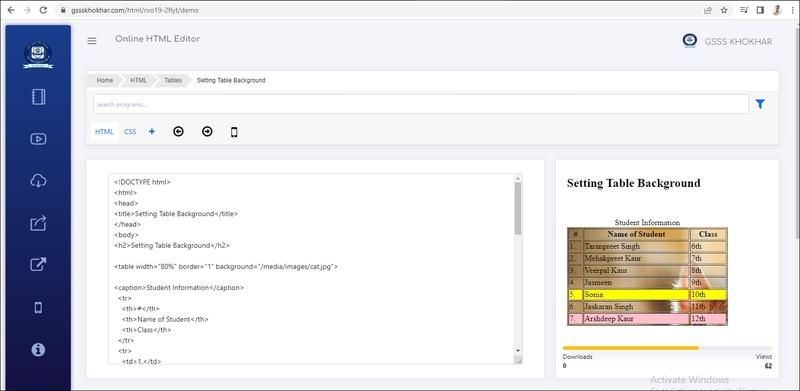
Setting Table Background


Setting Table Background

ਅਸੀਂ ਹੇਠਾਂ ਦਿੱਤੇ ਦੇ ਐਟਰੀਬਿਊਟਸ ਵਿੱਚ ਕਿਸੇ ਇੱਕ ਐਟਰੀਬਿਊਟ ਦੀ ਵਰਤੋਂ ਕਰਦੇ ਹੋਏ ਟੇਬਲ ਦਾ ਬੈਕਗ੍ਰਾਊਂਡ ਕਰ ਸਕਦੇ ਹਾਂ:

• Bgcolor: ਇਹ ਐਟਰੀਬਿਊਟ ਪੂਰੇ ਟੇਬਲ ਲਈ ਬੈਕਗ੍ਰਾਊਂਡ ਦਾ ਰੰਗ ਬਦਲਣ ਲਈ ਵਰਤਿਆ ਜਾਂਦਾ ਹੈ। ਇਸਦੀ ਵਰਤੋਂ ਕਿਸੇ ਵਿਸ਼ੇਸ਼ ਟੇਬਲ ਰੇਅ ਜਾਂ ਟੇਬਲ ਸੈੱਲ ਦਾ ਰੰਗ ਬਦਲਣ ਲਈ ਵੀ ਕੀਤੀ ਜਾ ਸਕਦੀ ਹੈ। ਇਸ ਐਟਰੀਬਿਊਟ ਦਾ ਮੁੱਲ ਰੰਗ ਦੇ ਨਾਮ (Color Name) ਜਾਂ ਹੋਕਸਾਡੈਸੀਮਲ ਕੋਡ (Hexadecimal Color Code) ਵਜੋਂ ਸੈੱਟ ਕੀਤਾ ਜਾ ਸਕਦਾ ਹੈ।

ਉਦਾਹਰਣ ਲਈ: <table bgcolor="pink">.......</table>

• Background: ਇਹ ਐਟਰੀਬਿਊਟ ਪੂਰੇ ਟੇਬਲ ਲਈ ਜਾਂ ਸਿਰਫ ਸੈੱਲ ਲਈ ਬੈਕਗ੍ਰਾਊਂਡ ਤਸਵੀਰ ਸੈੱਟ ਕਰਨ ਲਈ ਵਰਤਿਆ ਜਾਂਦਾ ਹੈ। ਇਸ ਐਟਰੀਬਿਊਟ ਦਾ ਮੁੱਲ ਫਾਈਲ ਐਕਸਟੈਂਸ਼ਨ ਸਮੇਤ ਤਸਵੀਰ ਦਾ URL (ਲੋਕੇਸ਼ਨ ਐਡਰੈੱਸ) ਹੁੰਦਾ ਹੈ। ਉਦਾਹਰਣ ਲਈ: <table background="back.jpg">.......</table>

ਇਹਨਾਂ ਐਟਰੀਬਿਊਟਸ ਨੂੰ HTML5 ਵਿੱਚ ਸਟਾਈਲ ਸੀਟਾਂ ਦੀ ਵੱਧ ਰਹੀ ਵਰਤੋਂ ਤਰਜੀਹ ਨਹੀਂ (deprecate) ਦਿਤੀ ਜਾਂਦੀ ਹੈ। 


Output


Live Demo & Try it yourself!
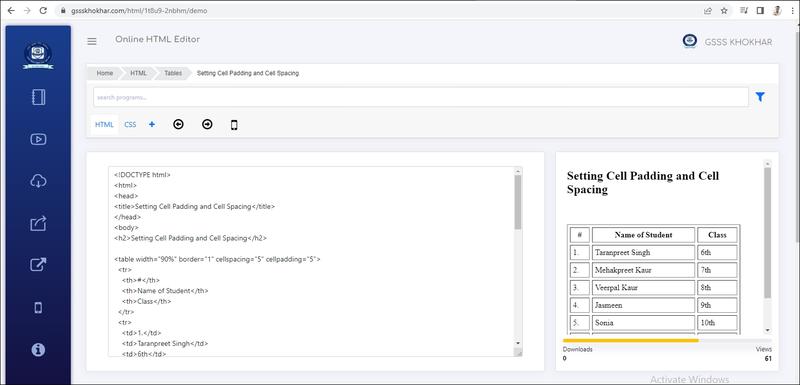
Setting Cell Padding and Cell Spacing


Setting Cell Padding and Cell Spacing

ਸੈੱਲ ਪੈਡਿੰਗ ਅਤੇ ਸੈੱਲ ਸਪੇਸਿੰਗ ਸੈੱਟ ਕਰਨਾ ( Setting Cell Packing and Cell Spacing):

ਸੈੱਲ ਪੈਡਿੰਗ ਅਤੇ ਸੈੱਲ ਸਪੇਸਿੰਗ ਦੀ ਵਰਤੋਂ ਟੇਬਲ ਸੈੱਲਾਂ ਵਿੱਚ ਖਾਲੀ ਜਗ੍ਹਾ ਨੂੰ ਐਡਜਸਟ ਕਰਨ ਲਈ ਕੀਤੀ ਜਾ ਸਕਦੀ ਹੈ। ਇਨ੍ਹਾਂ ਖਾਲੀ ਜਗ੍ਹਾਵਾਂ (Blank Spaces) ਨੂੰ ਵਿਵਸਥਿਤ ਕਰਨ ਲਈ ਟੇਬਲ ਟੈਗਜ਼ ਵਿੱਚ ਦੋ ਐਟਰੀਬਿਊਟਸ cellpadding ਅਤੇ cellspicing ਦੀ ਵਰਤੋਂ ਕੀਤੀ ਜਾਂਦੀ ਹੈ: • Cellpadding: ਸੈੱਲਪੈਡਿੰਗ ਟੇਬਲ ਸੈੱਲਾਂ ਨੂੰ ਫਾਰਮੈਟ ਕਰਨ ਅਤੇ ਸੈੱਲਾਂ ਦੀ ਦਿੱਖ ਵਧੀਆ ਬਣਾਉਣ ਲਈ ਇੱਕ ਮਹੱਤਵਪੂਰਣ ਵਿਸ਼ੇਸ਼ਤਾ ਹੈ।

Cellpadding: ਸੈੱਲਾਂ ਦੇ ਅੰਦਰ ਵਾਧੂ ਜਗ੍ਹਾ ਪ੍ਰਦਾਨ ਕਰਦੀ ਹੈ। ਇਹ ਐਟਰੀਬਿਊਟ ਸੈੱਲ ਬਾਰਡਰ (Cell Border) ਅਤੇ ਸੈੱਲ ਕੰਟੈਂਟ (Cell Content) ਦੇ ਵਿਚਕਾਰ ਦੀ ਦੂਰੀ ਨੂੰ ਐਡਜਸਟ ਕਰਨ ਲਈ ਵਰਤਿਆ ਜਾਂਦਾ ਹੈ। ਮੂਲ ਰੂਪ ਵਿੱਚ ਸੇਲਪੈਡਿੰਗ “1” ਪਿਕਸਲ ਹੁੰਦੀ ਹੈ। ਉਦਾਹਰਣ ਲਈ; <table cellpadding="5">

Cellspacing : HTML ਵਿੱਚ Cellspacing ਐਂਟਰੀਬਿਊਟ <table> ਟੈਗ ਦੀ ਇੱਕ ਹੋਰ ਮਹੱਤਵਪੂਰਣ ਵਿਸ਼ੇਸ਼ਤਾ ਹੈ। ਇਹ ਐਟਰੀਬਿਊਟ ਸੈੱਲਾਂ ਦੇ ਬਾਹਰ ਖਾਲੀ ਜਗ੍ਹਾ ਨੂੰ ਐਡਜਸਟ ਕਰਦਾ ਹੈ। Cellspacing ਐਟਰੀਬਿਊਟ ਦੀ ਵਰਤੋਂ ਕਰਦੇ ਹੋਏ ਅਸੀਂ ਟੇਬਲ ਸੈੱਲਾਂ ਦੇ ਵਿਚਕਾਰ ਖਾਲੀ ਜਗ੍ਹਾ ਨੂੰ ਸੈੱਟ ਕਰ ਸਕਦੇ ਹਾਂ। ਮੂਲ ਰੂਪ ਵਿੱਚ (By default) ਸੈਲਸਪੇਸਿੰਗ 2 ਪਿਕਸਲ ਹੁੰਦੀ ਹੈ।

ਉਦਾਹਰਣ ਲਈ: <table cellspacing="5">


Output


Live Demo & Try it yourself!
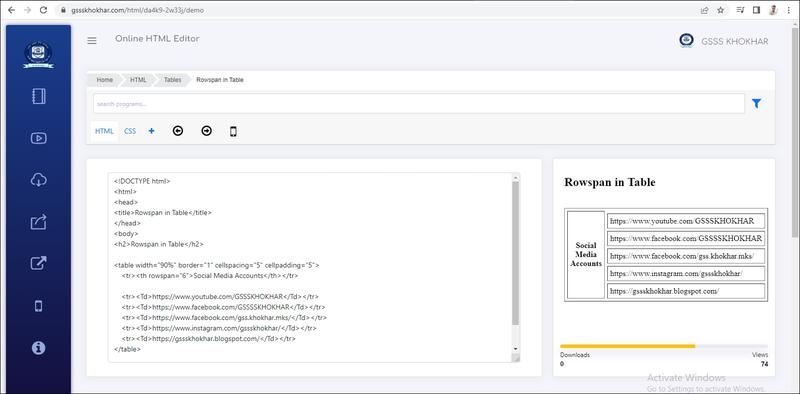
Rowspan in Table


Rowspan in Table

ਸੈੱਲਾਂ ਨੂੰ ਮਰਜ ਕਰਨਾ (Merging Cells):

Rowspan (ਰੋਅਸਪੈਨ): ਜੋ ਅਸੀਂ ਦੋ ਜਾਂ ਵਧੇਰੇ ਰੋਅਜ਼ ਦੇ ਸੈੱਲਾਂ ਨੂੰ ਜੋੜ ਕੇ ਇੱਕ ਸਿੰਗਲ ਸੈੱਲ ਬਨਾਉਣਾ ਚਾਹੁੰਦੇ ਹਾਂ, ਤਾਂ ਅਸੀਂ rowspan ਐਟਰੀਬਿਊਟ ਦੀ ਵਰਤੋਂ ਕਰਾਂਗੇ | rows pan ਐਟਰੀਬਿਊਟ ਦਾ ਘੱਟੋ ਘੱਟ ਮੁੱਲ 2 ਹੁੰਦਾ ਹੈ।


Output


Live Demo & Try it yourself!
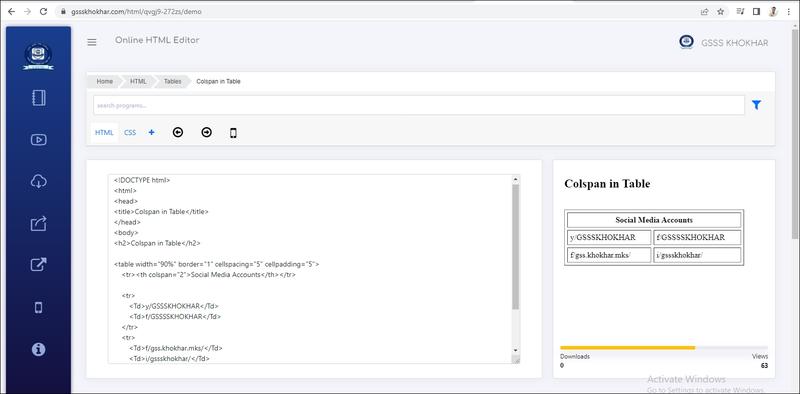
Colspan in Table


Colspan in Table

ਸੈੱਲਾਂ ਨੂੰ ਮਰਜ ਕਰਨਾ (Merging Cells):

ਸੈੱਲਾਂ ਨੂੰ ਮਰਜ ਕਰਨ ਦਾ ਮਤਲਬ ਦੋ ਜਾਂ ਦੋ ਤੋਂ ਵੱਧ ਸੈੱਲਾਂ ਨੂੰ ਜੋੜ ਕੇ ਇੱਕ ਸੈੱਲ ਬਣਾਉਣਾ ਹੈ। HTML ਟੇਬਲ ਵਿੱਚ Colspan ਅਤੇ Rowspan ਐਟਰੀਬਿਊਟਸ ਦੀ ਮਦਦ ਨਾਲ ਸੈੱਲਾਂ ਨੂੰ ਮਰਜ ਕੀਤਾ ਜਾ ਸਕਦਾ ਹੈ। ਇਹ ਐਟਰੀਬਿਊਟਸ <td> ਜਾਂ <th> ਟੈਗਜ਼ ਲਈ ਵਰਤੇ ਜਾਂਦੇ ਹਨ।

Colspan (ਕੋਲਸਪੈਨ): ਜੇ ਅਸੀਂ ਦੋ ਜਾਂ ਵਧੇਰੇ ਕਾਲਮਾਂ ਦੇ ਸੈੱਲਾਂ ਨੂੰ ਜੋੜ ਕੇ ਇੱਕ ਸਿੰਗਲ ਸੈੱਲ ਬਨਾਉਣਾ ਚਾਹੁੰਦੇ ਹਾਂ, ਤਾਂ ਅਸੀਂ colspan ਐਟਰੀਬਿਊਟ ਦੀ ਵਰਤੋਂ ਕਰਾਂਗੇ, ਜਿਵੇਂ ਕਿ ਚਿੱਤਰ 3.11 ਵਿੱਚ ਦਿਖਾਇਆ ਗਿਆ ਹੈ| Colspan ਐਟਰੀਬਿਊਟ ਦਾ ਘੱਟੋ ਘੱਟ ਮੁੱਲ 2 ਹੁੰਦਾ ਹੈ।

ਉਦਾਹਰਣ ਲਈ; <td colspan="3">


Output


Live Demo & Try it yourself!
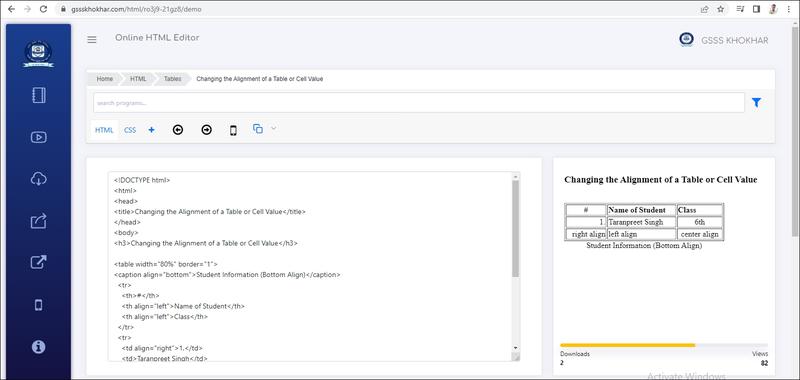
Changing the Alignment of a Table or Cell Value


Changing the Alignment of a Table or Cell Value

ਇੱਕ ਟੇਬਲ ਜਾਂ ਸੈੱਲ ਕੰਟੈਂਟਸ ਦੀ ਅਲਾਈਨਮੈਂਟ ਬਦਲਣਾ (Changing the Alignment of a Table or Cell Value):

ਅਲਾਈਨਮੈਂਟ ਦੋ ਤਰੀਕਿਆਂ ਨਾਲ ਸੈੱਟ ਕੀਤੀ ਜਾ ਸਕਦੀ ਹੈ: ਲੇਟਵੇਂ ਰੂਪ ਵਿੱਚ (Horizontally) ਅਤੇ ਖੜਵੇਂ ਰੂਪ ਵਿੱਚ (Verically)। ਟੇਬਲ ਨੂੰ ਸਿਰਫ ਲੇਟਵੇਂ ਰੂਪ ਵਿੱਚ ਅਲਾਈਨ ਕੀਤਾ ਜਾ ਸਕਦਾ ਹੈ ਜਦੋਂ ਕਿ ਸੈੱਲ ਕੰਟੈਂਟਸ ਨੂੰ ਲੇਟਵੇਂ ਅਤੇ ਖੜਵੇਂ ਦੋਵਾਂ ਤਰੀਕਿਆਂ ਨਾਲ ਅਲਾਈਨ ਕੀਤਾ ਜਾ ਸਕਦਾ ਹੈ।HTML ਟੇਬਲਾਂ ਨਾਲ ਸੰਬੰਧਤ ਵੱਖ-ਵੱਖ ਟੈਗਜ਼ ਵਿੱਚ ਅਲਾਈਨਮੈਂਟ ਸੈੱਟ ਕਰਨ ਦੇ ਵੱਖ-ਵੱਖ ਤਰੀਕਿਆਂ ਸੰਬੰਧੀ ਜਾਣਕਾਰੀ ਹੇਠਾਂ ਦਿੱਤੀ ਗਈ ਹੈ

ਲੇਟਵੇਂ ਰੂਪ ਵਿੱਚ ਅਲਾਈਨਮੈਂਟ ਸੈੱਟ ਕਰਨਾ (Setting Horizontal Alignment):


Align ਐਟਰੀਬਿਊਟ ਦੀ ਵਰਤੋਂ ਕਰਕੇ ਅਸੀਂ ਟੇਬਲ ਅਤੇ ਇਸਦੇ ਸੈੱਲ ਕੰਟੈਂਟਸ ਦੀ ਲੇਟਵੇਂ ਰੂਪ ਵਿੱਚ ਅਲਾਈਨਮੈਂਟ ਸੈੱਟ ਕਰ ਸਕਦੇ ਹਾਂ। HTML ਡਾਕੂਮੈਂਟ ਵਿੱਚ ਵਰਤੇ ਜਾਂਦੇ ਵੱਖ-ਵੱਖ ਟੇਬਲ ਟੈਗਜ਼ ਲਈ lien ਐਂਟਰੀਬਿਊਟ ਦੀ ਵਰਤੋਂ ਸੰਬੰਧੀ ਜਾਣਕਾਰੀ ਇਸ ਪ੍ਰਕਾਰ ਹੈ।

<table>: ਟੈਗ ਲਈ Align ਐਟਰੀਬਿਊਟ: ਮੂਲ ਰੂਪ ਵਿੱਚ (By default) ਟੇਬਲ ਵੈੱਬ ਪੇਜਾਂ ਵਿੱਚ ਖੱਬੇ ਪਾਸੇ ਵੱਲ ਅਲਾਈਨ ਦਿਖਾਇਆ ਜਾਂਦਾ ਹੈ। <able> ਟੈਗ ਵਿੱਚ align ਐਟਰੀਬਿਊਟ ਦੀ ਵਰਤੋਂ ਕਰਦੇ ਹੋਏ ਅਸੀਂ ਟੇਬਲ ਦੀ ਅਲਾਈਨਮੈਂਟ ਨੂੰ ਲੇਟਵੀਂ ਰੂਪ ਵਿੱਚ ਬਦਲ ਸਕਦੇ ਹਾਂ। <table› ਟੈਗ ਲਈ align ਐਟਰੀਬਿਊਟ ਦੇ ਮੁੱਲ Right, Left, ਜਾਂ Center ਸੈੱਟ ਕੀਤਾ ਜਾ ਸਕਦਾ ਹੈ।

ਉਦਾਹਰਣ ਲਈ <table align=right">

<tr> ਟੈਗ ਲਈ Align ਐਟਰੀਬਿਊਟ: ਮੂਲ ਰੂਪ ਵਿੱਚ (By default) ਟੇਬਲ ਰੇਅਜ਼ ਵਿੱਚ ਸੈੱਲ ਡਾਟਾ ਖੱਬੇ ਪਾਸੇ ਅਲਾਈਨ ਦਿਖਾਇਆ ਜਾਂਦਾ ਹੈ।<> ਟੈਗ ਵਿੱਚ align ਐਟਰੀਬਿਊਟ ਦੀ ਵਰਤੋਂ ਕਰਦੇ ਹੋਏ ਅਸੀਂ ਰੋਅ ਦੇ ਸਾਰੇ ਸੈੱਲਾਂ ਦੇ ਕੰਟੈਂਟਸ ਦੀ ਅਲਾਈਨਮੈਂਟ ਸਟਵ ਰੂਪ ਵਿੱਚ ਬਦਲ ਸਕਦੇ ਹਾਂ। <i> ਟੈਗ ਲਈ align ਐਟਰੀਬਿਊਟ ਦਾ ਮੁੱਲ Right, Left, Center ਜਾਂ Justify ਸੈੱਟ ਕੀਤਾ ਜਾ ਸਕਦਾ ਹੈ।

ਉਦਾਹਰਣ ਲਈ, <tr align="center">

<td> ਅਤੇ <th> ਟੈਗ ਲਈ Align ਐਟਰੀਬਿਊਟ: ਮੂਲ ਰੂਪ ਵਿੱਚ (By default) <i> ਦੁਆਰਾ ਪਰਿਭਾਸ਼ਤ ਸੈਲ ਕੰਟੇਂਟਸ ਖੱਬੇ ਪਾਸੇ ਅਲਾਈਨ ਦਿਖਾਈ ਦਿੰਦੇ ਹਨ ਜਦੋਂ ਕਿ <th> ਦੁਆਰਾ ਪਰਿਭਾਸ਼ਿਤ ਸੈੱਲ ਕੰਟੇਟਸ ਲਈ ਡਿਫਾਲਟ ਅਲਾਈਨਮੈਂਟ ਸੈਂਟਰ ਹੁੰਦੀ ਹੈ। ਜੇ ਅਸੀਂ <td> ਜਾਂ<th> ਟੈਗਜ਼ ਵਿੱਚ lign ਐਟਰੀਬਿਊਟ ਦੀ ਵਰਤੋਂ ਕਰਦੇ ਹਾਂ, ਤਾਂ ਇਹ ਉਸ ਖਾਸ ਸੈੱਲ ਦੀ ਲੇਟਵੇਂ ਰੂਪ ਵਿੱਚ ਅਲਾਈਨਮੈਂਟ ਨੂੰ ਬਦਲ ਦੇਵੇਗਾ ਜਿਸ ਤੇ ਇਹ ਲਾਗੂ ਕੀਤਾ ਗਿਆ ਹੈ। <d> ਅਤੇ <th> ਟੈਗਜ਼ ਵਿੱਚ align ਐਟਰੀਬਿਊਟ ਦਾ ਮੁੱਲ Right, Left, Center ਜਾਂ Justify ਸੈੱਟ ਕੀਤਾ ਜਾ ਸਕਦਾ ਹੈ।

ਉਦਾਹਰਣ ਲਈ <td align="center">

<caption> ਟੈਗ ਲਈ Align ਐਟਰੀਬਿਊਟ ਮੂਲ ਰੂਪ ਵਿੱਚ ਇੱਕ ਟੇਬਲ ਟਾਈਟਲ ਸੈਂਟਰ ਅਲਾਈਨਡ ਹੁੰਦਾ ਹੈ ਅਤੇ ਟੇਬਲ ਦੇ ਉੱਪਰ ਦਿਖਾਇਆ ਜਾਂਦਾ ਹੈ। Align ਐਂਟਰੀਬਿਊਟ ਨਾਲ ਟੇਬਲ ਦੇ ਟਾਈਟਲ ਦੀ ਅਲਾਈਨਮੈਂਟ ਨੂੰ ਟੇਬਲ ਦੇ ਉੱਪਰ ਜਾਂ ਨਿਚਲੇ ਪਾਸੇ ਸੈੱਟ ਕੀਤਾ ਜਾ ਸਕਦਾ ਹੈ। ਆਮ ਤੌਰ ਤੇ <caption> ਟੈਗ ਲਈ align ਐਟਰੀਬਿਊਟ ਦਾ ਮੁੱਲ Top ਜਾਂ Bottom ਸੈੱਟ ਕੀਤਾ ਜਾਂਦਾ ਹੈ। ਜੇ ਅਸੀਂ align="Top" ਸੈੱਟ ਕਰਦੇ ਹਾਂ, ਤਾਂ ਟਾਈਟਲ ਟੇਬਲ ਦੇ ਉੱਪਰ ਪ੍ਰਦਰਸ਼ਿਤ ਕੀਤਾ ਜਾਵੇਗਾ ਅਤੇ ਜੇ ਅਸੀਂ ਚਾਹੁੰਦੇ ਹਾਂ ਕਿ ਟਾਈਟਲ ਟੇਬਲ ਦੇ ਹੇਠਾਂ ਪ੍ਰਦਰਸ਼ਿਤ ਹੋਵੇ ਤਾਂ ਅਸੀਂ <caption> ਟੈਗ ਲਈ align="Bottom" ਮੁੱਲ ਦੀ ਵਰਤੋਂ ਕਰ ਸਕਦੇ ਹਾਂ।ਪਰੰਤੂ align ਐਟਰੀਬਿਊਟ ਨੂੰ CSS ਸਟਾਈਲਸੀਟਾਂ ਦੀ ਵੱਧ ਰਹੀ ਵਰਤੋਂ ਕਾਰਨ HTML5 ਵਿੱਚ depreciate ਕੀਤਾ ਗਿਆ ਹੈ।

ਉਦਾਹਰਣ ਲਈ, <caption align="bottom">


Output


Live Demo & Try it yourself!
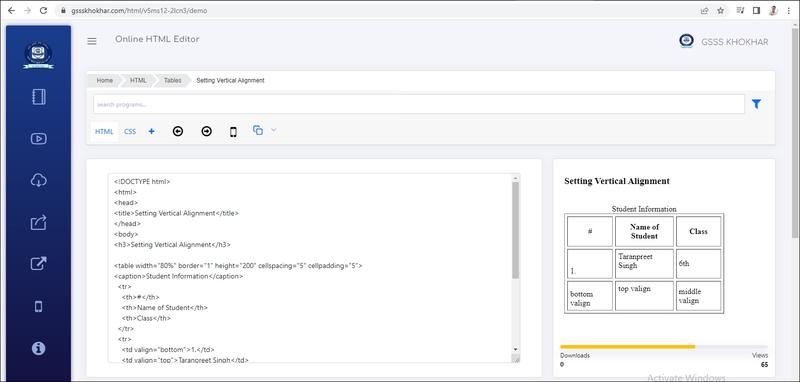
Setting Vertical Alignment


Setting Vertical Alignment

ਖੜਵੇ ਰੂਪ ਵਿੱਚ ਅਲਾਈਨਮੈਂਟ ਸੈੱਟ ਕਰਨਾ (Setting Vertical Alignment):

ਅਸੀਂ valign ਐਟਰੀਬਿਊਟ ਦੀ ਵਰਤੋਂ ਕਰਦੇ ਹੋਏ ਸਿਰਫ ਸੈੱਲ-ਕੰਟੈਂਟਸ ਦੀ ਅਲਾਈਨਮੈਂਟ ਨੂੰ ਹੀ ਖੜਵੇਂ ਰੂਪ ਵਿੱਚ ਸੈੱਟ ਕਰ ਸਕਦੇ ਹਾਂ। HTML ਵਿੱਚ Valign ਐਟਰੀਬਿਊਟ ਦੀ ਵਰਤੋਂ <td>, <th> ਅਤੇ <tr> ਟੈਗਜ਼ ਵਿੱਚ ਕੀਤੀ ਜਾਂਦੀ ਹੈ। HTML ਡਾਕੂਮੈਂਟ ਵਿੱਚ ਵਰਤੇ ਜਾਂਦੇ ਵੱਖ-ਵੱਖ ਟੇਬਲ ਟੈਗਜ਼ ਲਈ valign ਐਂਟਰੀਬਿਊਟ ਦੀ ਵਰਤੋਂ ਸੰਬੰਧੀ ਜਾਣਕਾਰੀ ਇਸ ਪ੍ਰਕਾਰ ਹੈ।

<tr> ਟੈਗ ਲਈ valign ਐਟਰੀਬਿਊਟ: ਮੂਲ ਰੂਪ ਵਿੱਚ ਟੇਬਲ ਰੇਅਜ਼ ਵਿੱਚ ਸੈੱਲ ਬਾਟਾ ਨੂੰ ਖੜਕੇ ਤੌਰ ਤੇ ਸੈਂਟਰ ਵਿੱਚ ਅਲਾਈਨ ਦਿਖਾਇਆ ਜਾਂਦਾ ਹੈ।<tr> ਟੈਗ ਵਿੱਚ valign ਐਟਰੀਬਿਊਟ ਦੀ ਵਰਤੋਂ ਕਰਦੇ ਹੋਏ ਅਸੀਂ ਰੋਅ ਦੇ ਸਾਰੇ ਸੈੱਲਾਂ ਲਈ ਕੰਟੈਂਟਸ ਦੀ ਖੜਵੇਂ ਰੂਪ ਵਿੱਚ ਅਲਾਈਨਮੈਂਟ ਨੂੰ ਬਦਲ ਸਕਦੇ ਹਾਂ। ਆਮ ਤੌਰ ਤੇ <p> ਟੈਗ ਲਈ Valien ਐਟਰੀਬਿਊਟ ਦਾ ਮੁੱਲ Top, Middle ਜਾਂ Bottom ਹੋ ਸਕਦਾ ਹੈ।

ਉਦਾਹਰਣ ਲਈ, <tr align="top">

<td> ਅਤੇ <th> ਟੈਗ ਲਈ valign ਐਟਰੀਬਿਊਣ: ਮੂਲ ਰੂਪ ਵਿੱਚ <td> ਅਤੇ <th> ਦੇ ਸੇਲ ਕੰਟੈਂਟਸ ਨੂੰ ਖੜਵੇਂ ਰੂਪ ਵਿੱਚ ਸੈਂਟਰ ਅਲਾਈਨ ਦਿਖਾਇਆ ਜਾਂਦਾ ਹੈ। ਜੇ ਅਸੀਂ <d> ਜਾਂ <th> ਟੈਗਜ਼ ਵਿੱਚ vali ਐਟਰੀਬਿਊਟ ਦੀ ਵਰਤੋਂ ਕਰਦੇ ਹਾਂ, ਤਾਂ ਇਹ ਉਸ ਖਾਸ ਸੈੱਲ ਦੀ ਅਲਾਈਨਮੈਂਟ ਨੂੰ ਖੜਵੇਂ ਰੂਪ ਵਿੱਚ ਬਦਲ ਦੇਵੇਗਾ ਜਿਸ ਉੱਪਰ ਇਸ ਨੂੰ ਲਾਗੂ ਕੀਤਾ ਜਾਵੇਗਾ। ਆਮ ਤੌਰ ਤੇ <tr> ਅਤੇ <th> ਟੈਗਜ਼ ਲਈ Valign ਐਟਰੀਬਿਊਟ ਦਾ ਮੁੱਲ Top, Middle ਜਾਂ Bottom ਸੈੱਟ ਕੀਤਾ ਜਾ ਸਕਦਾ ਹੈ।

ਉਦਾਹਰਣ ਲਈ, <td valign="bottom">


Output


Live Demo & Try it yourself!
thead, tbody & tfoot Tags


thead, tbody & tfoot Tags


Output


Live Demo & Try it yourself!
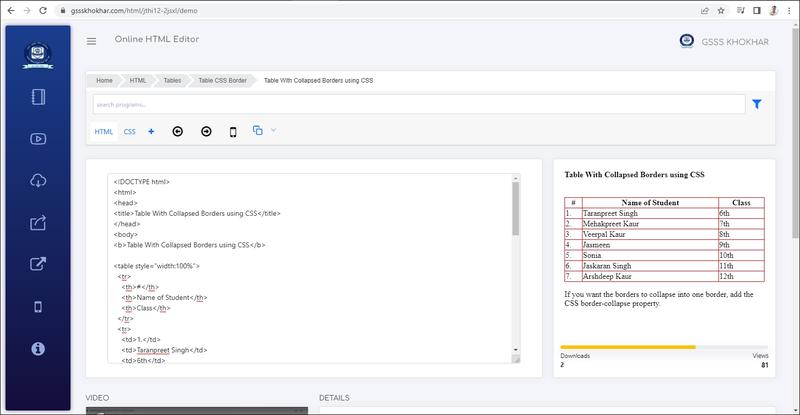
Table With Collapsed Borders using CSS


Table With Collapsed Borders using CSS


Output


Live Demo & Try it yourself!
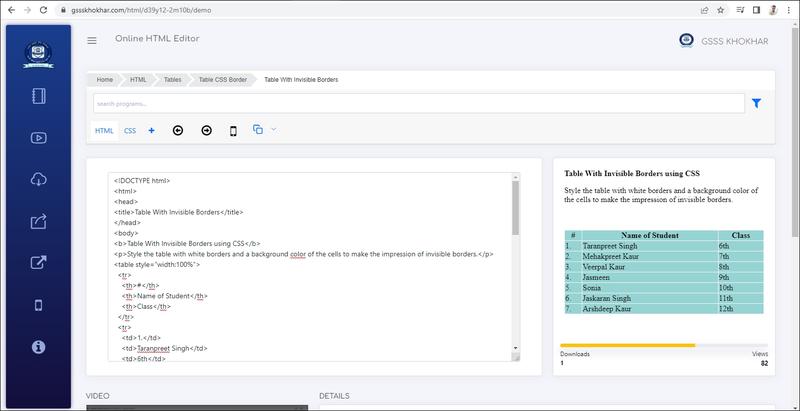
Table With Invisible Borders


Table With Invisible Borders


Output


Live Demo & Try it yourself!
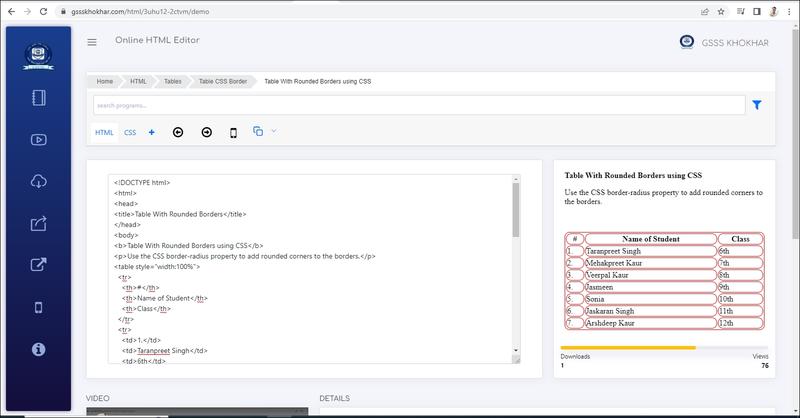
Table With Rounded Borders using CSS


Table With Rounded Borders using CSS


Output


Live Demo & Try it yourself!
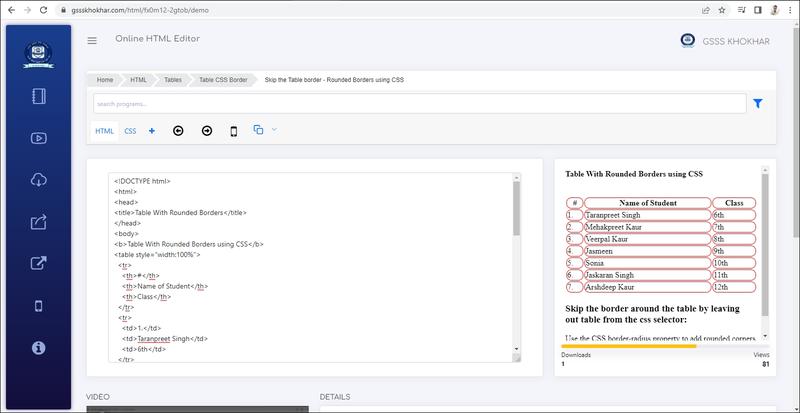
Skip the Table border - Rounded Borders using CSS


Skip the Table border - Rounded Borders using CSS


Output


Live Demo & Try it yourself!
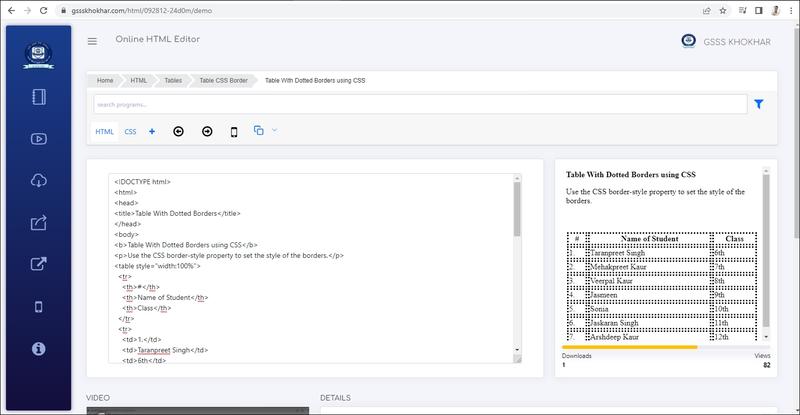
Table With Dotted Borders using CSS


Table With Dotted Borders using CSS


Output


Live Demo & Try it yourself!
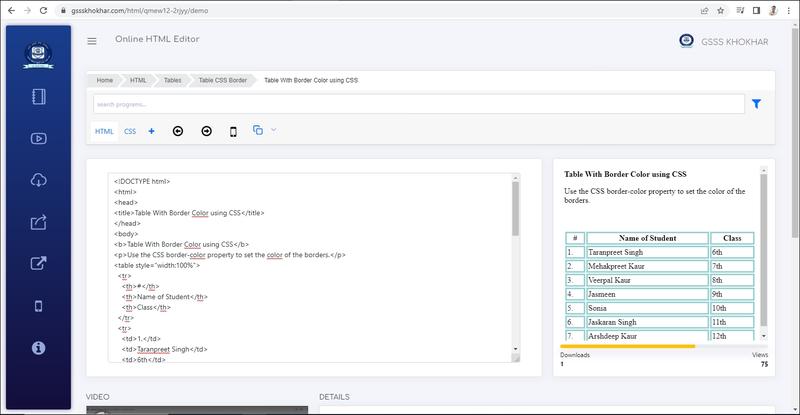
Dotted Table Borders

With the border-style property, you can set the appearance of the border.

The following values are allowed:

  • dotted     
  • dashed     
  • solid     
  • double     
  • groove     
  • ridge     
  • inset     
  • outset     
  • none     
  • hidden

Table With Border Color using CSS


Table With Border Color using CSS


Output


Live Demo & Try it yourself!
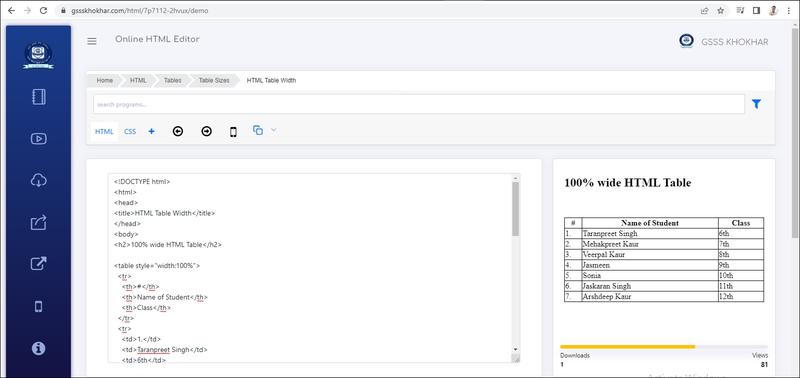
HTML Table Width


HTML Table Width

HTML tables can have different sizes for each column, row or the entire table.

Use the style attribute with the width or height properties to specify the size of a table, row or column.


HTML Table Width

To set the width of a table, add the style attribute to the <table> element:


Output


Live Demo & Try it yourself!
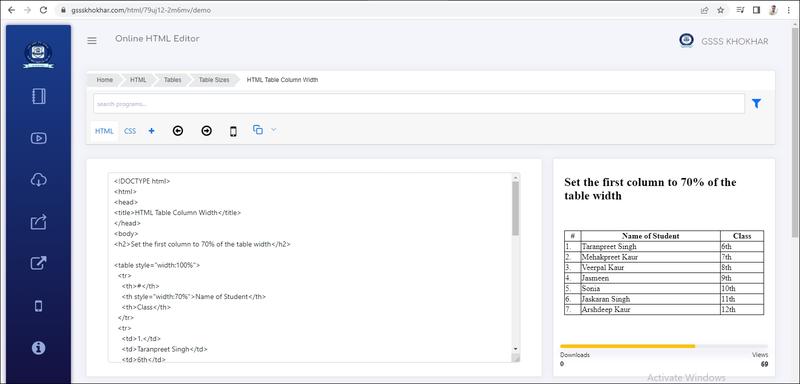
Note: Using a percentage as the size unit for a width means how wide will this element be compared to its parent element, which in this case is the <body> element.

HTML Table Column Width


HTML Table Column Width

To set the size of a specific column, add the style attribute on a <th> or <td> element:


Output


Live Demo & Try it yourself!
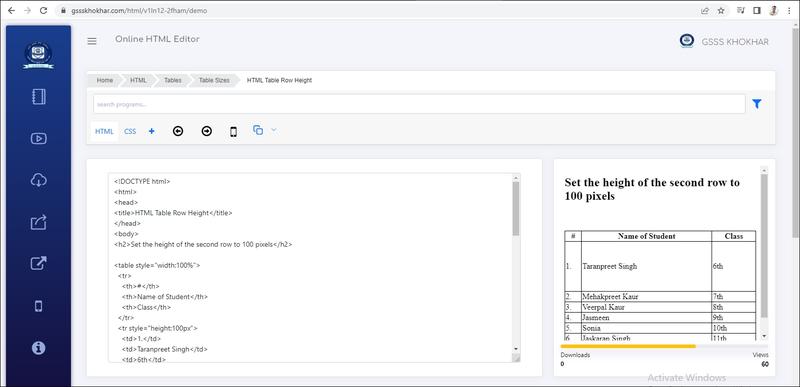
HTML Table Row Height


HTML Table Row Height

To set the height of a specific row, add the style attribute on a table row element:


Output


Live Demo & Try it yourself!
HTML Table Headers


HTML Table Headers

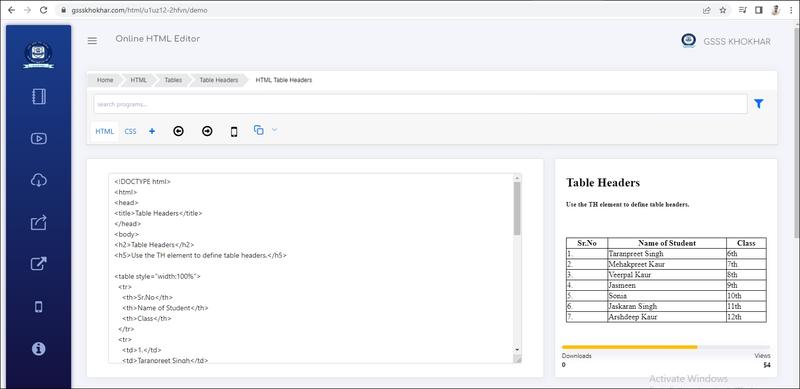
HTML tables can have headers for each column or row, or for many columns/rows.


HTML Table Headers

Table headers are defined with th elements. Each th element represents a table cell.


Output


Live Demo & Try it yourself!
Vertical Table Headers


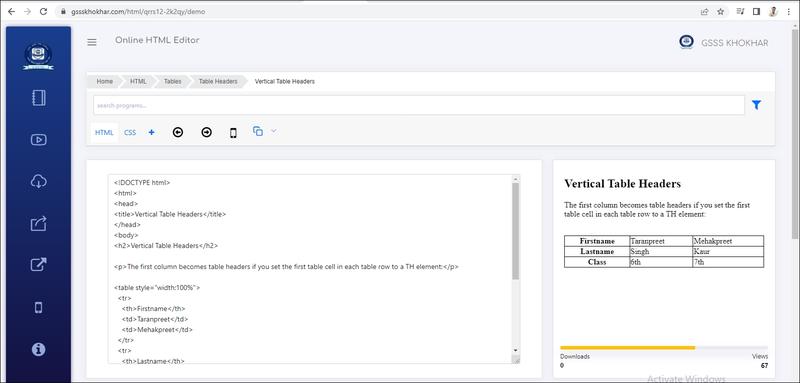
Vertical Table Headers

To use the first column as table headers, define the first cell in each row as a <th> element:


Output


Live Demo & Try it yourself!
HTML Table - Zebra Stripes


HTML Table - Zebra Stripes

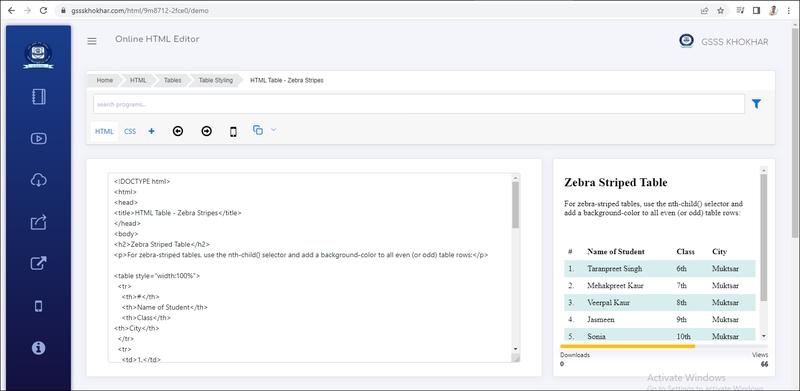
If you add a background color on every other table row, you will get a nice zebra stripes effect.

To style every other table row element, use the :nth-child(even) selector like this:

Pseudo-class :nth-child()

The :nth-child() pseudo-class represents an element that has an+b siblings before it in the document tree, for any positive integer or zero value of n, and has a parent element.

Syntax

selector:nth-child(an+b){ properties }


  • The examples of an+b are as follows:
    •  :nth-child(2n) /* represents every even element */
    •  :nth-child(even) /* same, represents every even element */
    •  :nth-child(2n+1) /* represents every odd element */
    •  :nth-child(odd) /* same, represents every odd element */
    •  :nth-child(10n-1) /* represents the 9th, 19th, 29th, etc, element */


Output


Live Demo & Try it yourself!
Note: If you use (odd) instead of (even), the styling will occur on row 1,3,5 etc. instead of 2,4,6 etc.

n can be a number, a keyword (odd or even), or a formula (like an + b).


HTML Table - Vertical Zebra Stripes


HTML Table - Vertical Zebra Stripes

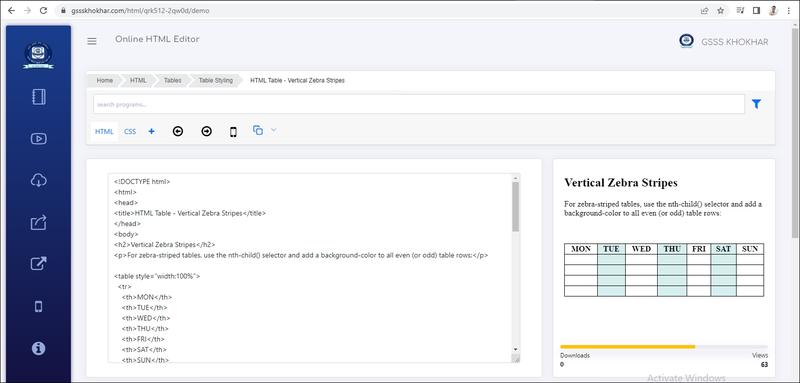
To make vertical zebra stripes, style every other column, instead of every other row.

Set the :nth-child(even) for table data elements like this:


Output


Live Demo & Try it yourself!
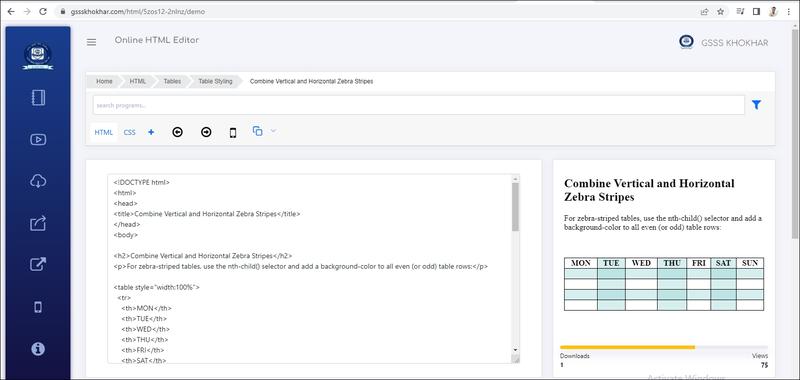
Note: Put the :nth-child() selector on both th and td elements if you want to have the styling on both headers and regular table cells.

Combine Vertical and Horizontal Zebra Stripes


Combine Vertical and Horizontal Zebra Stripes

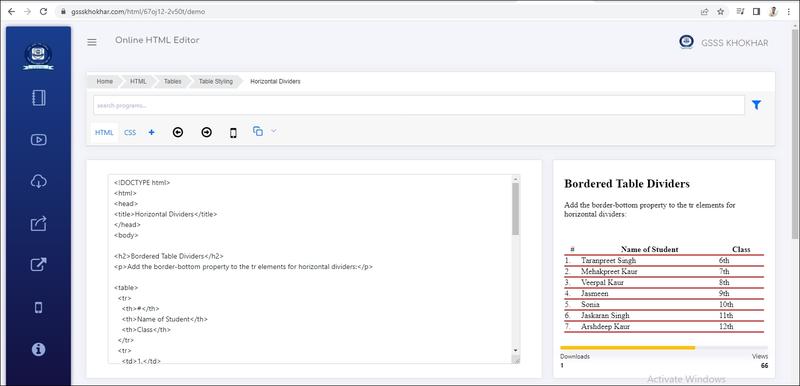
You can combine the styling from the two examples above and you will have stripes on every other row and every other column.

If you use a transparent color you will get an overlapping effect.

Use an rgba() color to specify the transparency of the color:


Output


Live Demo & Try it yourself!
Horizontal Dividers


Horizontal Dividers

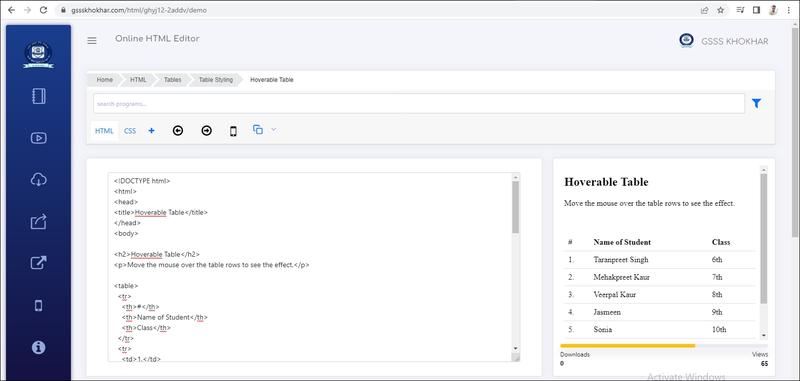
If you specify borders only at the bottom of each table row, you will have a table with horizontal dividers.

Add the border-bottom property to all tr elements to get horizontal dividers:


Output


Live Demo & Try it yourself!
Hoverable Table


Hoverable Table

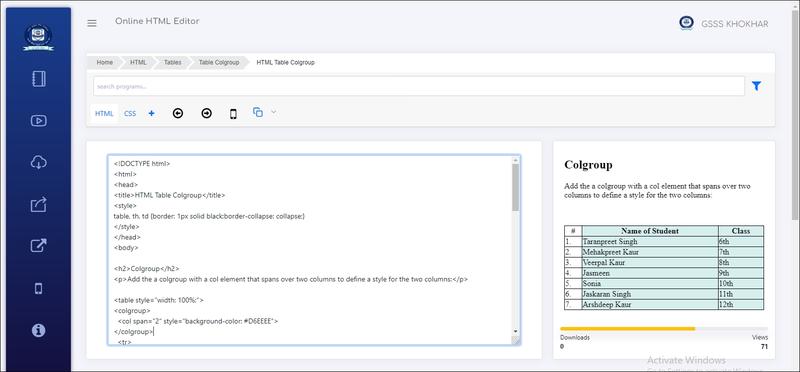
Use the :hover selector on tr to highlight table rows on mouse over:


Output


Live Demo & Try it yourself!
HTML Table Colgroup


HTML Table Colgroup

HTML Table Colgroup

If you want to style the two first columns of a table, use the <colgroup> and <col> elements.

MON TUE WED THU FRI SAT SUN
1 2 3 4 5 6 7
8 9 10 11 12 13 14
15 16 17 18 19 20 21
22 23 24 25 26 27 28

The <colgroup> element should be used as a container for the column specifications.

Each group is specified with a <col> element.

The span attribute specifies how many columns that get the style.

The style attribute specifies the style to give the columns.

Note: There is a very limited selection of legal CSS properties for colgroups.


Output


Live Demo & Try it yourself!
Note: The <colgroup> tag must be a child of a <table> element and should be placed before any other table elements, like <thead><tr><td> etc., but after the <caption> element, if present.

Legal CSS Properties

There is only a very limited selection of CSS properties that are allowed to be used in the colgroup:

width property
visibility property
background properties
border properties

All other CSS properties will have no effect on your tables.

Multiple Col Elements


Multiple Col Elements

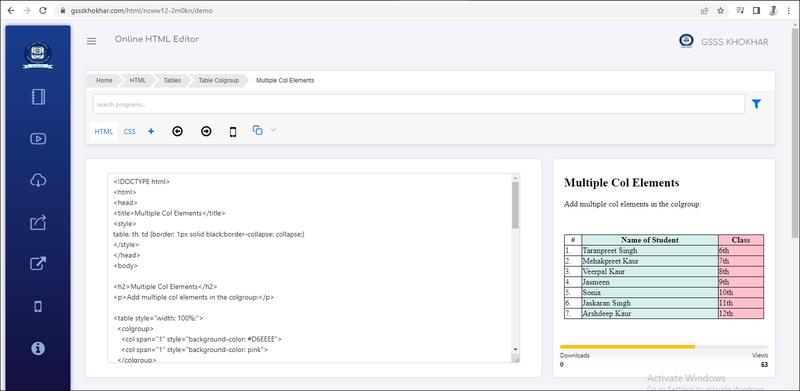
If you want to style more columns with different styles, use more <col> elements inside the <colgroup>:


Output


Live Demo & Try it yourself!
Empty Colgroups


Empty Colgroups

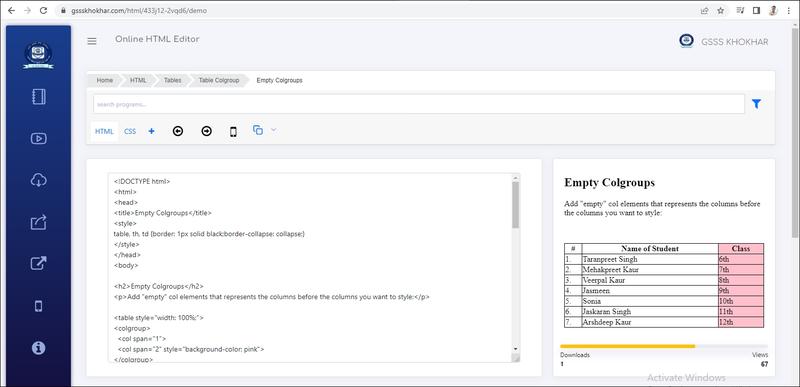
If you want to style columns in the middle of a table, insert a "empty" <col> element (with no styles) for the columns before:


Output


Live Demo & Try it yourself!
Hide Columns


Hide Columns

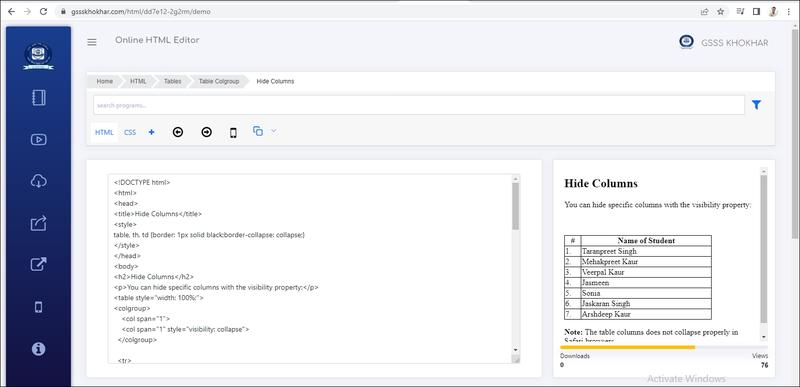
You can hide columns with the visibility: collapse property:


Output


Live Demo & Try it yourself!
