
What are Semantic Elements?
A semantic element clearly describes its meaning to both the browser and the developer.
Examples of non-semantic elements: <div> and <span> - Tells nothing about its content.
Examples of semantic elements: <form>, <table>, and <article> - Clearly defines its content.
Semantic Elements in HTML
Many web sites contain HTML code like: <div id="nav"> <div class="header"> <div id="footer"> to indicate navigation, header, and footer.
In HTML there are some semantic elements that can be used to define different parts of a web page:
- <article>
- <aside>
- <details>
- <figcaption>
- <figure>
- <footer>
- <header>
- <main>
- <mark>
- <nav>
- <section>
- <summary>
- <time>
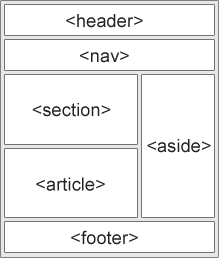
HTML <section> Element
The <section> element defines a section in a document.
According to W3C's HTML documentation: "A section is a thematic grouping of content, typically with a heading."
Examples of where a <section> element can be used:
- Chapters
- Introduction
- News items
- Contact information
A web page could normally be split into sections for introduction, content, and contact information.
Live Demo & Try it yourself!
Semantic Elements in HTML
Below is a list of some of the semantic elements in HTML.
| Tag | Description |
|---|---|
| <article> | Defines independent, self-contained content |
| <aside> | Defines content aside from the page content |
| <details> | Defines additional details that the user can view or hide |
| <figcaption> | Defines a caption for a <figure> element |
| <figure> | Specifies self-contained content, like illustrations, diagrams, photos, code listings, etc. |
| <footer> | Defines a footer for a document or section |
| <header> | Specifies a header for a document or section |
| <main> | Specifies the main content of a document |
| <mark> | Defines marked/highlighted text |
| <nav> | Defines navigation links |
| <section> | Defines a section in a document |
| <summary> | Defines a visible heading for a <details> element |
| <time> | Defines a date/time |

